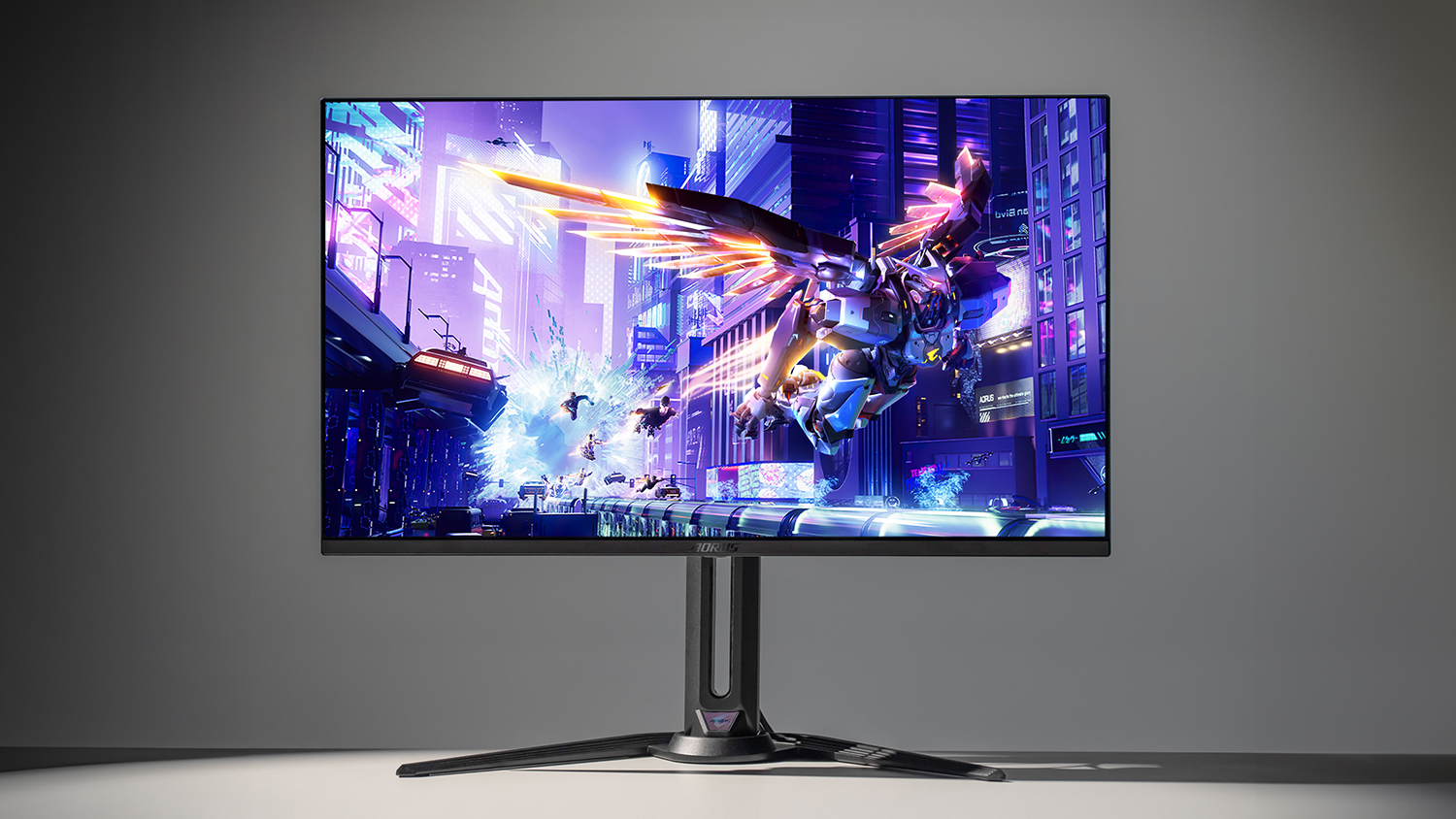
Two 32-inch QD-OLED panels, the same Samsung third-generation glass underneath both, the same 4K 240Hz headline, and the same 0.03ms response figure, and yet picking between the MSI MPG 322URX and the Gigabyte AORUS FO32U2P is one of the more genuinely awkward decisions a UK creator faces this year. When TFTCentral confirmed MSI’s 2025 release of the 322URX with DisplayPort 2.1, it effectively set up a head-to-head against a Gigabyte screen that had already been on desks since 2024. On paper they are near-twins. In practice, the small print is where one pulls ahead for the kind of work I’d want a £1,200-plus monitor to do.
So let me be clear about who this is for. If you’re a colourist, a photographer, a video editor or a designer in the UK weighing these two as a “do everything, then game on the weekend” display, the differences that matter are not the ones plastered across the box. They’re tucked into the colour figures, the USB-C wattage and the warranty terms.
| Spec | MSI MPG 322URX | Gigabyte AORUS FO32U2P | Edge |
|---|---|---|---|
| Panel | 31.5" Samsung Gen3 QD-OLED, 4K 240Hz, 0.03ms | 31.5" Samsung Gen3 QD-OLED, 4K 240Hz, 0.03ms | Tie |
| Colour gamut | 138% sRGB, 98% Adobe RGB | 100% sRGB, 99% DCI-P3 | MSI for print, Gigabyte for video |
| USB-C power | 98W | 65W | MSI |
| DisplayPort | DP 2.1 UHBR20 (80Gbps) | DP 2.1 UHBR20 (80Gbps) | Tie |
| Burn-in cover | OLED Care 2.0 (preventative software) | 3-year warranty incl. burn-in cover | Gigabyte |
| UK price (approx) | ~£699 Currys / ~£748.99 Scan | from ~£849.97 | MSI on price |
| Overall winner | MSI MPG 322URX (most creators) | Gigabyte FO32U2P (DCI-P3 / warranty) | MSI |
Round 1: The panel is a tie, and that’s the point
Both monitors are built on a 31.5-inch Samsung third-generation QD-OLED panel running 3840×2160 at 240Hz, with a 0.03ms grey-to-grey response and VESA DisplayHDR True Black 400 certification. That’s not marketing overlap; it’s the literal same class of panel, as the side-by-side spec comparison lays out. So anyone telling you one of these is dramatically sharper or faster than the other is selling you a story. The motion clarity, the per-pixel contrast, the inky True Black HDR, that’s a shared inheritance, and it is the same QD-OLED look that makes panels like the LG G6 OLED so compelling on the TV side.
What that means for a creator is reassuring and slightly liberating: you are not trading away image quality whichever way you jump. The decision is about everything that wraps around the panel. Winner: tie.
Round 2: Colour, where MSI quietly makes its case
Here’s the first real fork. The MSI MPG 322URX covers 138% sRGB and 98% Adobe RGB, while the Gigabyte AORUS FO32U2P is quoted at 100% sRGB and 99% DCI-P3. If you only read the sRGB numbers you’d think they’re close, but the gamut that matters depends entirely on your workflow.
If you do print work, retouching, or anything that touches the Adobe RGB space, MSI’s 98% Adobe RGB coverage is the more useful figure by a distance, the Gigabyte’s spec sheet leads with DCI-P3 instead, which is the video and cinema colour space. That’s the tell. Gigabyte has aimed the FO32U2P at the broadcast and film-adjacent crowd with its 99% DCI-P3; MSI has leaned towards the photo and print side with strong Adobe RGB. Neither is “better” in the abstract. But for a UK photographer prepping work for print, perhaps pairing it with Capture One or Lightroom, the MSI is the more natural tool. Winner: MSI for photo and print; Gigabyte for video.
The panel decides the picture; the ports, the wattage and the warranty decide whether the monitor actually fits the way you work.
Round 3: One cable, and how much it carries
Both screens carry DisplayPort 2.1 with UHBR20, the full 80Gbps tier, which on paper means uncompressed 4K at 240Hz with no Display Stream Compression at all. TFTCentral’s coverage of the Gigabyte FO32U2P and of the MSI release both make the same caveat plain: as of early 2025, the graphics cards that can actually drive UHBR20 to its full extent are thin on the ground, the sort of GPU you’d find in a RTX 5090 creator laptop. So this is future-proofing more than a feature you’ll exploit on day one. It’s a reason to buy either of these over an older DisplayPort 1.4 OLED, not a reason to pick one over the other. Winner: tie.
The USB-C story is where they split again, and it’s the spec I’d weight most heavily if you’re a laptop-first creator. The MSI MPG 322URX delivers 98W of USB-C power, enough to run and charge most creative laptops over a single cable. The Gigabyte FO32U2P tops out at 65W. For a MacBook Pro or a beefier Windows workstation laptop like the Framework Laptop 16, that 33W gap is the difference between the monitor keeping your machine topped up under load and your battery slowly draining while you edit. Sixty-five watts is fine for an ultrabook; it’s marginal for the kind of laptop a serious creator actually owns.
Round 4: One-cable power, and MSI’s clear lead
Following on from those wattage figures, this is the round with the cleanest result of the whole comparison. If your desk is a laptop on a stand and a single USB-C cable doing display, data and charging, the MSI’s 98W is the spec that makes that setup actually work without a second power brick cluttering the desk. The Gigabyte’s 65W will hold an ultrabook steady but lose ground against a 16-inch creative laptop running an export. For the one-cable creator, this is not close. Winner: MSI.
Round 5: Burn-in, warranty and the long game
OLED still asks you to think about longevity in a way LCD never did, and both manufacturers know it. Gigabyte backs the FO32U2P with a three-year warranty that explicitly includes panel burn-in cover, which is the kind of term that does real work on a screen you intend to keep for years of full-day editing. MSI counters with its OLED Care 2.0 suite of protective features, pixel shifting, panel refresh routines and the rest, as detailed in thePCenthusiast’s review.
I’d separate those two things, because they’re not the same kind of reassurance. OLED Care 2.0 is preventative software; the Gigabyte warranty is what catches you if prevention fails. For a creator running static UI panels, timelines and toolbars on screen eight hours a day in Final Cut Pro or DaVinci Resolve, an explicit burn-in warranty is worth more than another acronym, it’s the safety net, not the seatbelt. That’s a genuine point in Gigabyte’s favour, and the one thing that gives me pause about defaulting to the MSI. Winner: Gigabyte.
Round 6: Price and timing, the UK reality
The Gigabyte arrived first, in 2024, and has had time for its street price to settle, landing from around £849.97 in current UK stock. The MSI MPG 322URX is the 2025 newcomer, and despite carrying the fresher spec it actually undercuts on price in the UK right now, roughly £699 at Currys and £748.99 at Scan. Both sit in the premium tier, and rightly so; these are not screens you cross-shop against a cheap 4K panel, they’re tools you amortise over years of paid work, the same way you would a high-refresh esports panel like the Sony Inzone M10S.
That pricing flips the usual newer-versus-established logic on its head: here the fresher screen is also the cheaper one in the UK, while the established Gigabyte sits higher and leans on its warranty to justify the gap. Re-check both live figures before you commit, since OLED prices move, but as it stands MSI wins the value round outright. Winner: MSI.
What I’d plug in
For most UK creators, and I mean photographers, retouchers and laptop-tethered editors specifically, I’d take the MSI MPG 322URX. The 98W USB-C delivery, the stronger Adobe RGB coverage and the lower UK price are the three specs that actually change your working day, and MSI wins all three. That’s where I’d put the weight.
But I wouldn’t be dogmatic about it, and here’s exactly what would flip me. If your work lives in DCI-P3, video, motion, anything cinema-bound, the Gigabyte AORUS FO32U2P’s 99% DCI-P3 is the better-aimed tool, and its explicit three-year burn-in warranty is a real, bankable reassurance on a panel you’ll hammer daily. If you’re a desktop user who doesn’t need a drop of USB-C power and you’d rather have the warranty than the wattage, take the Gigabyte with a clear conscience; you’re not giving up the panel, only the convenience. The screen is the same. The fit is what differs, so buy for the work you actually do, not the box art.
Where I land: 9.0/10 for the MSI MPG 322URX, 8.6/10 for the Gigabyte AORUS FO32U2P — close on paper, but the MSI is the one I’d put my own money on.
Final verdict
MSI MPG 322URX vs Gigabyte AORUS FO32U2P: two 4K 240Hz QD-OLED monitors on the same Samsung panel. Which one a UK creator should actually buy, and why.
How we compare
Buyer action
Where to buy or check next
Use this as the final check before ordering a phone, changing network or trusting a headline monthly price.





Reader discussion
Leave a comment
Comments are moderated. Keep it useful, accurate, and on topic.