UPDATED · News · 3 Jun 2026 · Daniel Reid
The Microsoft 365 Copilot redesign gives the assistant a cleaner, calmer app that is easier to learn, and for UK users that matters most because it lands weeks before a price change on 1 July 2026. Microsoft 365 chief design officer Jon Friedman set out the new look in a 28 May 2026 post on the official Microsoft 365 blog, describing a Copilot that opens with a focused interface and reveals more only when you ask for it. This guide explains what is actually changing on screen, where to find the features you use, and how UK businesses can turn the new layout into faster, safer adoption rather than another tool to ignore.
We have read the source post in full and checked every claim below against it. Where Microsoft has not named a feature, we have not invented one. The result is a plain account of a redesign that is more about removing clutter than adding gadgets, which is exactly what most teams asked for.
Key facts: what the redesign is and why now
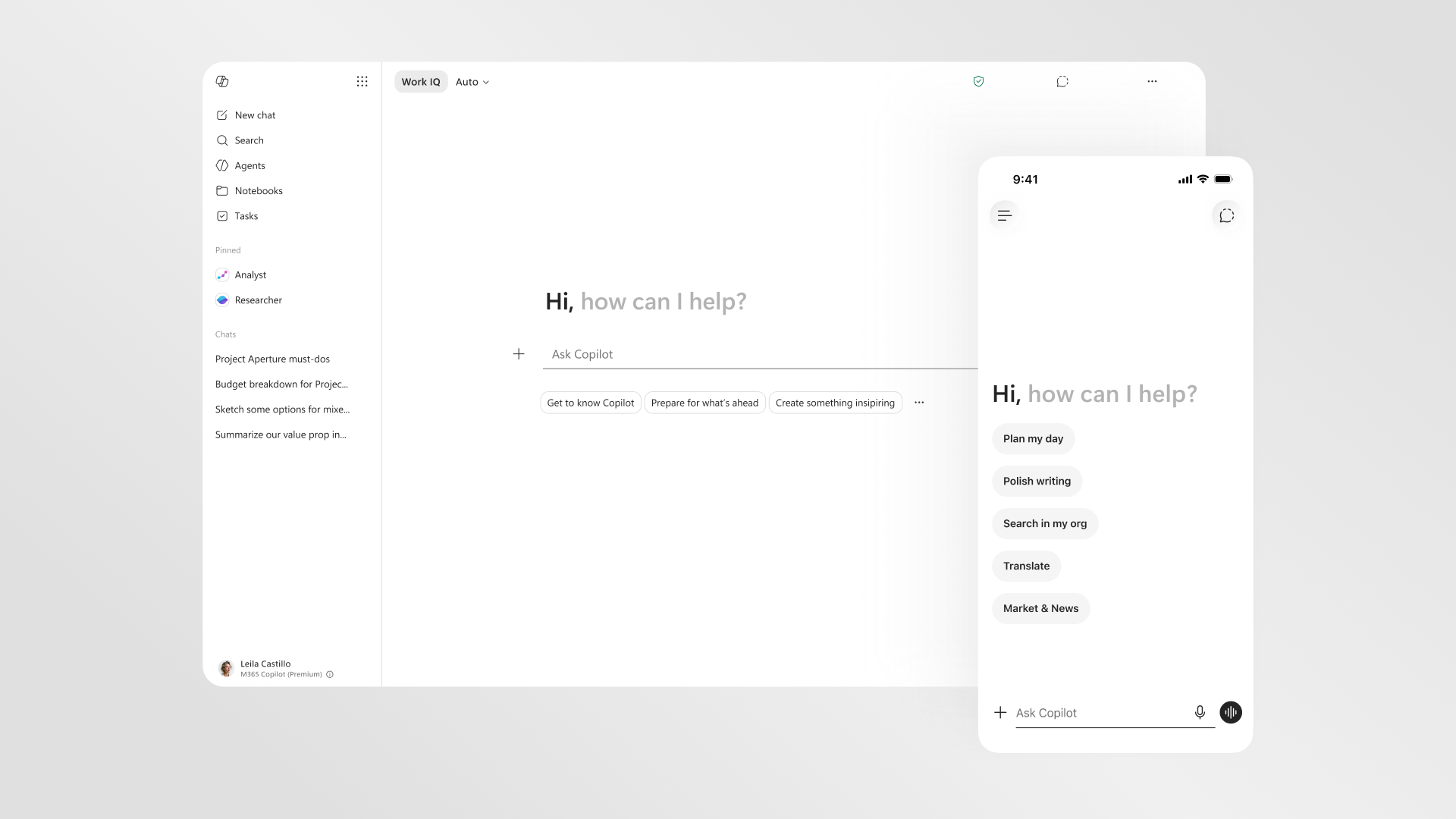
The new design is a rebuilt Copilot app and a more consistent Copilot experience inside Word, Excel, PowerPoint and Outlook. The headline idea is progressive disclosure: Microsoft describes “starting with a clean, focused interface, then revealing more capabilities as you need them”. A left navigation pane that expands and contracts now gives “a clearer space for agents, conversations, and history”, so the things you return to are easier to find. The work also targets speed, with Microsoft saying the app “loads more than twice as fast, with load times reduced by over 50%” and that response times for complex chat prompts have improved by 10%.
The timing is the UK story. The redesign is free and arrives just before the licence cost moves, so British teams get a friendlier interface at the same moment the bill rises. We covered the numbers in our explainer on the Microsoft 365 Copilot UK price rises on 1 July 2026, and the sensible reading is to treat the new look as a reason to drive real usage before you pay more per seat. A tool people actually open is far easier to justify at renewal.

The new app layout, in plain terms
Open Copilot and the first thing you notice is restraint. Instead of a busy wall of options, you get a focused space to start a prompt, with the left pane holding your agents, conversations and history. Microsoft describes the prompt area as something that “can expand to fill the experience, making room for deeper work”, so a quick question stays small while a longer task gets room to breathe. The aim is to make the blank-page moment less daunting, which is the single biggest barrier we see when teams first try Copilot.
Inside Word, Excel, PowerPoint and Outlook, the experience is now more consistent. Microsoft says it “introduced a new experience for Copilot in the apps, a consistent entry point across apps that sits above your work”. In practice that means the place you summon Copilot, and the way it behaves, no longer changes character as you move between documents and spreadsheets. For training, that consistency is the quiet win: you teach the pattern once and it holds everywhere, which shortens the time it takes a new starter to feel competent. If you are weighing Copilot against other assistants for writing tasks, our guide to the best AI writing assistant UK 2026 sets out where each tool is strongest.
Agents take centre stage
The biggest conceptual change is how prominent agents have become. The left pane now reserves a clear space for them, and Microsoft frames the assistant as a set of capability-focused helpers rather than one generic chatbot. The post names Designer, Researcher, and dedicated Word, Excel and PowerPoint agents, with the idea that each interaction “fits the task at hand, rather than forcing a generic one”. So when you are building a deck, the PowerPoint agent is the natural tool; when you are cleaning data, the Excel agent is.

This matters for adoption because “use Copilot” is vague, while “use the Excel agent to tidy this export” is a task someone can repeat. UK managers can build short playbooks around named agents and measure whether people actually reach for them. The same agent-first direction runs through Microsoft’s wider strategy, which we unpacked after the developer conference in our look at what the Microsoft Build 2026 keynote means for businesses. If your fleet is due a refresh, the agent workload also shapes hardware choices, covered in our guide to Microsoft Surface for business in 2026.
Chat, conversations and history
Chat remains the heart of Copilot, but the redesign tidies how you live with it. Conversations and history sit in the left pane alongside agents, so returning to yesterday’s work no longer means hunting through a flat list. The performance work lands here too: the 10% improvement Microsoft cites is specifically for complex chat prompts, which are the long, multi-step requests where waiting is most painful. Faster, better-organised chat is unglamorous, but it is the difference between a tool people open daily and one they abandon after a week.
There is also a behaviour change worth flagging for nervous teams. When Copilot works inside a document, Microsoft says it can “suggest changes or make them, with clear signals so you always know what it’s doing”. Those clear signals are the bit governance leads should test, because trust grows when people can see exactly what the assistant touched before they accept it. We drew similar lessons from a very large rollout in our piece on what UK enterprises should learn from the Accenture Copilot deployment.
Work IQ: the context behind the answers
The redesign also surfaces Work IQ, which Microsoft describes as “an intelligence layer you can see when active and directly control”, drawing on “your emails, files, chats, and meetings”. The phrasing is deliberate. The selling point is not only that Copilot knows your work context, but that you can see when that context is in play and switch it off. For UK organisations bound by data-protection duties, visible and controllable context is the feature that makes an information governance officer breathe out.
Practically, Work IQ is where a Copilot pilot either earns trust or loses it. We would advise UK teams to document, in plain language, what Work IQ can see and how a user turns it off, then put that one-page note in front of staff before the first session. The same controllability principle is becoming a theme across Microsoft’s regulated-sector work, including its early healthcare effort that we examined in our preview of Microsoft Copilot Health for British readers.
Does the redesign justify the new price?
Microsoft is clearly trying to show the assistant is being used, not just bought. The post reports in-app usage rising after recent changes, with increases it puts at 27% in Word, 33% in Excel, 43% in PowerPoint and 30% in Outlook. Those are Microsoft’s figures rather than independent ones, so treat them as direction rather than gospel, but the pattern is the point: a cleaner entry point in the apps appears to pull more people in. A redesign on its own does not justify a higher licence fee. Higher, sustained usage might.
For a UK SME the maths is simple enough. If the redesign lifts genuine daily use before 1 July, the per-seat increase is easier to absorb because each seat is doing more work. If usage stays flat, the price rise is harder to defend and you should be honest about cutting seats. Either way, the new layout gives you a fresh reason to relaunch Copilot internally, and a relaunch is the cheapest lever you have to improve return on a tool you are already paying for.

It is worth separating two questions that often get muddled. The first is whether the redesign is good, and on the evidence it is: cleaner, faster and easier to teach. The second is whether Copilot earns its place in your budget, which depends entirely on your own usage data rather than Microsoft’s. A finance director should hold both thoughts at once and resist the temptation to let a polished interface stand in for a return-on-investment case. Run the pilot, watch the numbers, and let the new design make the tool easier to test rather than easier to oversell.
Training and adoption tips for UK SMEs
Start with the agents, not the abstract idea of artificial intelligence. Pick three concrete tasks your team does weekly, map each to the matching agent, and write a one-line recipe for each. Show people the left pane so they can find their history and reopen work. Demonstrate the in-app side experience inside Word and Excel so the consistent entry point becomes muscle memory. Then show Work IQ and, crucially, how to turn it off, because the staff who trust a tool are the ones who feel in control of it.
Keep the first session under 30 minutes and measure one number afterwards: how many people opened Copilot the next day. Adoption is a habit problem, not a feature problem, and the redesign helps only if your launch turns curiosity into routine. Smaller firms often learn fastest from each other, which is why we gathered practical takeaways for founders in our write-up of five lessons for UK SMEs from the London developer keynote. Borrow what works, ignore the hype, and judge the tool by whether people reach for it unprompted.

One more practical point: name a champion in each team rather than relying on a single central trainer. The new layout is simple enough that a confident colleague can answer most questions in the flow of work, which scales far better than a help desk ticket. Ask each champion to log the three questions they hear most in the first fortnight, then fold those answers into your one-page recipe sheet. That feedback loop costs almost nothing and tends to lift usage more than any formal course, because it fixes the friction people actually hit rather than the friction a vendor imagines.
Key takeaways at a glance
| Detail | What Microsoft says |
|---|---|
| Announced | 28 May 2026, Microsoft 365 blog, by chief design officer Jon Friedman |
| Core idea | Progressive disclosure: clean start, more capability on demand |
| Navigation | Expanding and contracting left pane for agents, conversations and history |
| Named agents | Designer, Researcher, plus Word, Excel and PowerPoint agents |
| In-app experience | Consistent Copilot entry point across Word, Excel, PowerPoint and Outlook |
| Context layer | Work IQ, visible and user-controllable, drawing on emails, files, chats and meetings |
| Speed | Loads more than twice as fast, over 50% faster load times; 10% faster complex chat responses |
| Reported usage lift | Word 27%, Excel 33%, PowerPoint 43%, Outlook 30% (Microsoft figures) |
| UK timing | Lands before the 1 July 2026 UK price change |
Where to buy or check next in the UK
Microsoft 365 Copilot is a per-user subscription added to an eligible Microsoft 365 plan, so the redesign reaches you through your existing licence rather than a shop checkout. Start at the Microsoft UK store to confirm your current plan, the per-seat price and the date any change applies to your account, and check whether your business agreement bills monthly or annually before renewal. If you buy through a reseller, ask them in writing what the 1 July 2026 change means for your specific contract and whether you can adjust seat counts.
For the hardware Copilot runs on, Currys, John Lewis and Amazon UK all stock Copilot-ready Windows laptops and Surface devices, so compare price, delivery windows, warranty length and the returns period before you commit. John Lewis remains worth a look for its longer guarantee on many machines, while Currys often wins on business bundles. If you lease devices, check whether your provider’s refresh cycle lines up with the agent-heavy workloads the new Copilot encourages, because an underpowered fleet undercuts any software gain.

Our view is that this is a confident, sensible redesign that fixes the right problems. The clutter is gone, agents are easy to find, Work IQ is honest about what it sees, and the speed gains are real enough to notice. We would adopt it now and use it as the trigger to relaunch Copilot across your team before the 1 July price change, because the cheapest way to justify the new cost is to lift usage you are already entitled to.
Who should wait? Only firms that have not yet decided whether Copilot belongs in their workflow at all. For them the redesign changes the interface, not the underlying question of value, and a short structured pilot answers that better than a prettier app. What would change our recommendation is independent usage data: Microsoft’s own figures point the right way, but we would upgrade this from sensible to essential once neutral evidence confirms the productivity lift holds outside Microsoft’s own reporting.
| What we like | What we would watch |
|---|---|
| Progressive disclosure removes the intimidating blank-page clutter | Usage figures are Microsoft’s own, not independent |
| Named agents make “use Copilot” into repeatable, teachable tasks | Redesign timing sits right before the 1 July 2026 price rise |
| Work IQ is visible and user-controllable, which helps UK governance | Real value still depends on sustained adoption, not the new look |














Reader discussion
Leave a comment
Comments are moderated. Keep it useful, accurate, and on topic.