This post is from our Windows Phone 7 archive. For our current coverage of phones, see our 2026 best phones in the UK for 2026.
Read the 2026 best phones in the UK for 2026 guide →HTC HD2 Review: The best smartphone ever?
Intro For many years Windows Mobile users have been disappointed every time a new handset was announced because this or that feature was missing. Not long ago…

Intro
For many years Windows Mobile users have been disappointed every time a new handset was announced because this or that feature was missing. Not long ago it was screen resolutions, people wanted VGA screens, before that it was Wi-Fi or GPS, 3D acceleration or camera flashes etc. This year HTC finally announced what everybody’s been wishing and waiting for. A Windows Mobile smartphone that has every single feature imaginable (besides a hardware keyboard), the HTC HD2. Will this device be enough for the power user? Is it too late to “save” WM6.5 ?
The Hardware
First we are going to look at what we’ve got here. With its 4.3inch WVGA display the HTC HD2 has the biggest capacitive touchscreen on a phone ever and is the first capacitive Windows Mobile device. Made popular by the iPhone (followed by Android devices) capacitive touch panels enable multi-touch/point input unlike commonly used resistive touch-panels and a smoother finger interaction thanks to the glass screen. Another advantage of this technology is that there is no air gap between the touch-panel and the lcd display so optical clarity and contrast is improved reducing the need for heavy backlighting making power draw lower. Unfortunately traditional stylus (or any other conventional object, finger nail) can no longer be used and this can be a problem with some Windows Mobile applications.

Other that the huge screen which is the first thing you notice when you see the HD2, the device’s second most important component is Qualcomm’s SnapDragon chipset (QSD8250) which is composed of a 1ghz CPU and 600Mhz DSP. The CPU is a derivative of the ARMv9 Cortex8 architecture and includes an AMD Z430 GPU featuring a unified pixel & vertex shader pipeline (based on the Xbox 360 Xenos GPU) and is OpenGL-ES 2.0 compatible. To make it simple, it’s the fastest mobile SoC out now (nVidia’s Tegra APX is close but the ARM11 CPU currently used is holding it back).
Besides those two important features the HD2 packs a 5Mpix camera with autofocus, dual LED flash, 448Mb of Ram, 512Mb of Rom, Micros USB port, 3.5mm jack; FM radio, aGPS, Digital Compass etc… Better yet the whole package is only 11mm thick. The HTC HD2 is what every smartphone nerd has been waiting.

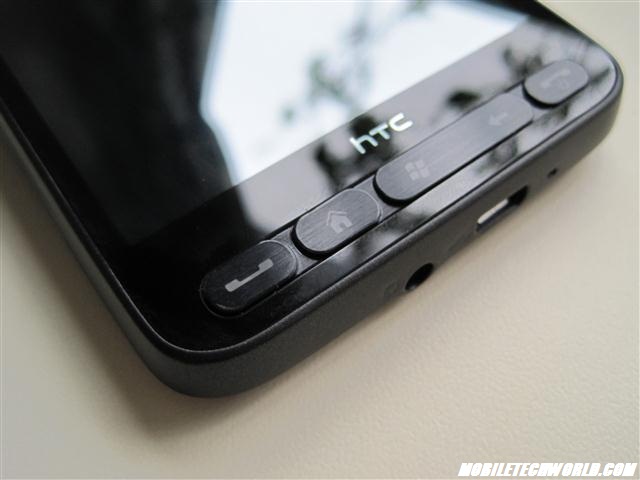
As you can see in the pictures the HD2 isn’t that much bigger than the iPhone and is actually 1mm slimmer. The build quality is the best I’ve seen on any smartphone so far especially compared to HTC’s previous offering who nearly all suffered from so form of manufacturing defect. The black HTC Trinity/P3600 paint chipping, same thing on the HTC Touch HD, the dust between the screen and digitizer on some Diamond2s etc.. So far I didn’t notice anything wrong with the HD2, it feels tight in the hand and the metallic battery cover is definitely makes the phone feels solid. Beware thought the screen is a huge piece of glass and dropping the phone will surely destroy (just head over the XDA forums to witness how many users have already cracked their HD2s screen!). The only negative is the lack of dedicated camera button. Thanks to the iPhone, HTC has now decided that taking picture/videos by tapping on the screen was a good idea. It is not, especially on the phone of the size of the HD2, I always fear that is slip from my hand when I use the camera.
The screen sensitivity is a tiny bit too high for my taste which makes the use of the on-screen keyboard tricky at times (I didn’t install any of the tweaking CABS). I find it funny that everybody was bitching because Windows Mobile devices didn’t have sensitive/responsive enough touchscreens and now it’s the other way around.
The Software
Let’s talk about what everybody’s been waiting for…the software. How does the HTC HD2 handle the OS that everybody loves to hate, Windows Mobile 6.5. First I must admit that I have been using Windows Mobile for many years because I think that it is what suits me the best and because it’s the most feature rich Mobile OS currently available (Android is getting pretty close though). But when it comes to 6.5 one has to wonder how a company like Microsoft got the nerves to release such a worthless update. To put it simply, given the fact that HTC skinned nearly all of the WM UI, you wouldn’t even notice it if the HD2 was actually running WM 6.1. Anyway, I’ll talk more about Windows Mobile later on.
HTC Sense
As you already know the HD2 runs HTC’s latest UI called Sense (formally known as TouchFlo3D) and this is where the fun begins. Sense brings the dragon inside the HD2 alive. The UI is so far the best I’ve used on a mobile device. It’s fast, responsive, nice & smooth. It’s not the easiest to use though, the iPhone is still the best in this department. I’ve been using an iPhone 3G as my main device for the past 6months and the first days with the HD2 were a little bit painful. But this was mainly because some apps like Outlook kind of felt out of place and the level of customization made the iPhone look like a toy. So I had to re-accommodate myself to a phone that does a whole lot more than the one I was using before. It does many things better and a couple of things worst.
The Lock Screen

The lock screen is one of the only native piece of Windows Mobile 6.5 UI you’ll encounter when using this device. Reminiscent of the iPhone’s slide to unlock screen it features a slightly enhanced sliding mechanism that changes depending on the notifications popping up on the phone at any given time. Just tap on the slider and you’ll get more sliding options expanding and letting you directly access the application (emails, messages, missed calls & voicemails). At the bottom you have the date/ hour and if you have an appointment scheduled it will also show up down there which is really nice compared to the basic lock screen on the iPhone. The only downside is that Microsoft obviously placed the slider at the top of the screen to differentiate from Apples which makes hard to easily access especially with a big screen device like the HD2.
The Home Screen

The Home Screen is where all the fun begins and this is when you realize just how big the screen is. Just place is right next to the iPhone which is rendering x2.5 less pixels (480×320/HVGA) and you’ll know right away that were are on a whole other level and that going back to using an HVGA device will be something really hard to do. Even though it can look similar to previous TouchFlo/Mallina the new Sense Home Screen has some new tricks. The Major difference is the introduction of the six shortcuts, three are only visible at first so you’ll have to slide your finger up to have access to the rest (you can add more via some registry tweaks..). HTC has also skinned everything from the world clock to the alarm, something that was long overdue. The home screen now features animated backgrounds. Either the weather or 3 different wallpaper that you can select yourself).
Sense Tabs
I’m not going to go into too much detail about all the different tabs as you have probably already seen all this many times. The People Centric contact management introduced on the Diamond2 earlier this year has been refined with some nice Facebook integration. For example you can now have direct access to your friends’ photo galleries via their contact card or the HTC Album. The device you stream all the photos in real time and let you browse through them (pinch zooming etc..). HTC got finally rid of the horrible hard to use favorite contact selector and replaced it with a grid of 15 possible favs. The nice touch here it that you can assign different actions to each contact. I you wish you can say that when taping the picture it takes you directly to the contact card and taping beneath it will dial the number you selected beforehand or the other way around (assign a number /message to the picture and contact card to the name below). The messaging tab hasn’t really change same for the email tabs (it looks closer to the one on HTC’s Android devices). The internet tab now features bookmarks accessible via thumbnails which are a nice touch. The calendar has now been totally skinned so you have to ever get close to Windows Mobile’s default UI. Creating appointments is now handles directly through HTC’s UI. The Stocks is left untouched compared to the last version unlike the Photo & Video and music tabs. These two tabs have a new landscape mode. When you turn you device a nice 3D animation will be triggered and you’ll be presented with some cool looking cover flow like menu (just FYI Cover Flow wasn’t invented by Apple, they bought it…). Then you have the famous weather tab featuring some nice animation but still not really useful for anything other than basic weather forecast). The HTC Footprints geolocalisazion feature is now integrated into the UI now and HTC Peep; an integrated Twitter client. Peep could need some improvements thought, it’s slow to update, sometimes slow to scroll and the UI isn’t really intuitive. Finally we have the settings tab which now encompasses nearly every settings menu in Windows Mobile. AS far as I can see you can access 90% of the setting via HTC’s UI now.
General Use
The HTC HD2 is the fastest and snappiest phone I have ever used; yes it’s faster than the iPhone 3GS. Opening programs, sliding from tab to tab, taking pictures etc. everything is nearly instantaneous. The underlying OS hasn’t fundamentally changed, neither did HTC’s UI (it can run on previous MSM7201 devices) so all this comes from the SnapDragon chipset. And this kind of makes you sit back and think a little bit about what’s actually going on here. Windows Mobile as we know it is currently still based on the Windows CE 5.2 kernel (since WM5 back in 2004..) which isn’t even optimized for the latest ARM architectures (yes not even the MSM72XX) so everything is basically running in “brute force” mode. Just imagine what it would have been like if the HD2 was actually running a modern OS (WM7…). People wonder why a 400Mhz ARMv9 smartphone (the iPhone 3G) can be so smooth compared to higher spec’d devices on Windows Mobile, well that’s because in the case of the iPhone the OS is specifically tailored to the hardware. Just do some Binging or Googling for WinMo benchmarks and you’ll see that 4 years old devices sometimes come out faster than current phones. The original Samsung Omnia is a prime example of this situation. Using SPB Benchmark (which is quite old) the Omnia scores higher than the HD2 in the graphics index thanks to its Intel XScale core which is “supported” by Windows Mobile (see here).
Web Browsing

After heavily using an iPhone 3G for 6 months I was really eager to see how the HD2 stacks up against what is, in my opinion, the best mobile browser on the market (Safari Mobile). Web browsing is usually what I do the most on my smartphone so I really need something that correctly. As you already know Opera Mobile 9.7 is the default browser on the HD2 and the first thing I noticed is that the v-sync problem found on previous HTC devices was finally fixed. No more screen tearing when panning around web pages (especially in landscape) but then I also found out that the browser wasn’t running in OpenGL ES mode even-though it is supported (you can enabled it in the registry but it’s buggy and slow) thankfully HTC finally decided to implemented OpenVG drivers unlike in earlier devices (like the Diamond, TouchPro & HD) so you don’t lose much.

From a UX point Opera Mobile still can’t match Safari. The text reflow is a nice touch but it renders the pinch-zooming features annoying most of the time. For example if you pinch-zoom on a picture in a news post the whole screen will jump to the left once you release your fingers off the screen (because the text in the news article was reflowed to the left). Tabs are also handled better in Safari (thanks to the thumbnails view) same for the address bar. Another nice touch on the iPhone is the way it handles YouTube videos embed in a page, you get a thumbnail with a direct link to the YouTube application, in Opera you just have nothing…Opera has also a bad habit of not rendering pages correctly or just missing whole parts of a page so you have to hit the refresh button to reload the whole thing. The full page overview is also better on the on the iPhone, you see the whole webpage then zoom in while on Opera it is already zoomed in by default if the page you are accessing has a minimum resolution set. This can fixed by editing the in opera:config (but it tends to slow down rendering speed…).

This is not to say that browsing on the HD2 sucks. You just have to accommodate yourself to some of the shortcomings (just like you do when you first start to use an iPhone). The 4.3” display coupled with the WVGA definitely makes up for it. Page rendering is usually really fast and you have all the advantages of Windows mobile like downloading anything directly through the browser etc…Opera Mobile 10 Beta fixes nearly all the UI problems and many other things unfortunately it doesn’t support multi-touch zooming yet and the text is already reflowed in a weird way. Let’s all hope that HTC includes it in an upcoming ROM…
You can also use IEMobile but to put it simply…it sucks. Page rendering is slow (if it renders the page…) zooming is a pain and flash support is a joke (it crash every time I try to access MobileTechWorld..). Microsoft has a long way to go and hopefully the next version included in WM7 will be on par/better than Safari or Opera Mobile. The work done on the Zune HD is a set in the right direction.
Multimedia
Multimedia browsing and viewing has never been Windows Mobile’s strong point and this hasn’t changed with 6.5 which still packs the old Windows Media Player that doesn’t natively support Divx/MPEG and a fairly crappy image viewer. Thanks to HTC this is partially fixed by their HTC Album application that sits on top of the OS. Codec support is still the same (HTC Album “uses” WMP to handle video) but you get a nicely laid out interface. It should be noted that WMV and .MP4 decoding is hardware accelerated when using HTC Album (an WMP) unfortunately there are still some major incompatibilities depending on the bitrate/baseline etc used to compress the videos (and some video don’t show up in HTC’s app even though they can be played by opening them directly in the file explorer). Qualcomm’s SnapDragon Chipset support’s 720P decoding but because the player can’t even detect/open the files this feature is total unusable. I managed to play a WMV-HD trailer encoded in 720P (bitrate 5500Kb/s) in WMP but because the file was located on the supplied MicroSD (not SDHC) the player stopped every few seconds to buffer, but when it played it was fairly smooth. The other option is to uses the famous CorePlayer app, with it you can play nearly all codecs (no AC3 support thought) but everything is software decoded (you must select GDI rendering to get the best results). CoreCodec has been promising better decoding performance and a new UI in CorePlayer 2 for several years now but don’t get your hopes up, we probably won’t see it before the end of the year. The conclusion is that the HD2 can smoothly play any video file encoded in resolutions up to 800×480 (and a bit higher) but if you want 720P decoding you’ll have to wait for WM7 (see here).
Photo browsing is where the HD2 shines; with full multi-touch support the experience is the best on any device yet. And unlike the iPhone all your photos can be sorted in any resolution you want (the iPhone compress every photo that’s copied on it to make everything run smoothly.. yes it’s “cheating”) . There are so many things done better than on the iPhone here, like the ability to see your image properties, delete images other than the ones in the camera roll (worst iPhone “feature” ever) , upload photos/videos directly to Facebook/YouTube etc. The best part here is that HTC managed to overcome the 16bit limitation of Windows Mobile and render the images in what looks like 32bit (well it’s not real 32bit mode as they are probably using some advance dithering algorithm).
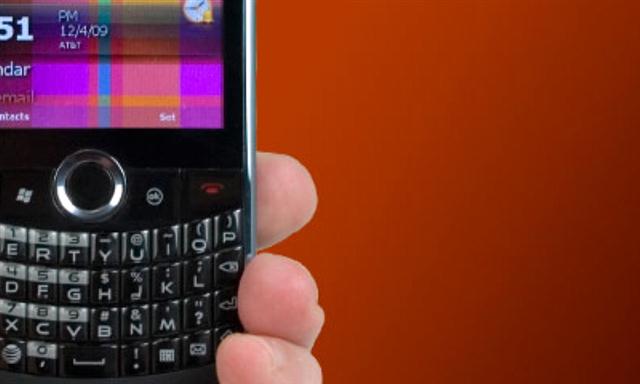
HTC Album
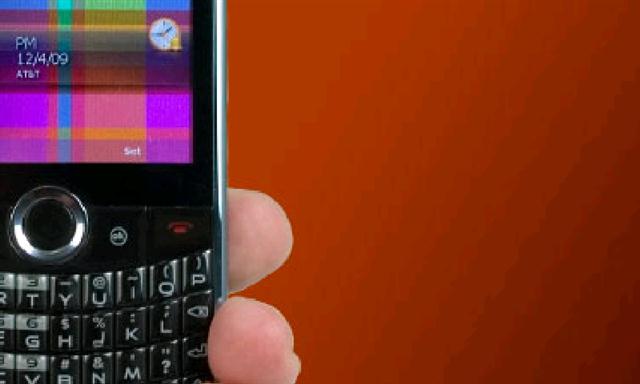
Windows Mobile Native Rendering
Speaking of YouTube, the HTC application is still one of the best around and the ability to select the video quality is just…..common sense. I still can’t figure out why the iPhone absolutely wants you to have crappy video quality when you are in 3G/HSDPA instead of Wifi, that’s just another case of Apple deciding what’s best for you. The only thing missing from HTC’s YouTube player is the ability to sync your favorite videos with your online account (something that the iPhone does).

The music tab hasn’t really changed besides the landscape mode and the fact that is is faster to navigate trough. Sound quality is fairly good and the Equalizer (Audio Booster) is a must.
Office Mobile, PDF and all the software on board
As usual, Microsoft’s Office Mobile, Adobe Reader and a whole lot of applications are included on the device. Because of the capacitive panel and the subsequent lack of stylus, HTC hacked/added multi-touch zooming into a couple of these apps (Office, Adobe Reader, Outlook, File Explorer etc). The implementation isn’t perfect but it gets the job done. You can enable this function in nearly all of the apps installed on your device with something like Zoomer.

What must be said here is that even though all those third party apps really stick out like a sour thumb because of their old finger unfriendly UI (yes even the recently released Office Mobile 2010 beta) they are what makes Windows Mobile so nice. You just feel like you have a small fully functional pc in the palm of your hand. On the other hand, Outlook mobile’s rendering of HTML emails is still abyssal compared to the iPhone and the only app that’s “missing” is HTC’s taskmanager that was on the top right (I can’t figure out why they took it out, but you can ad it back by downloading a .cab extracted from older HTC roms).

The Microsoft MyPhone syncing service is one of the best addition to Windows Mobile in years. It gets the job done simply and quickly (and it’s free!). Cloud Storerage space is currently only 250Mb but the next version should bump this quite a bit. Hopefully it will add MMS sycing support and also run on Microsoft’s Live Mesh/Azure technology.
Marketplace
Thankfully Windows Mobile doesn’t restrict you to an application store to install third party apps because as of right now Microsoft’s Windows Marketplace for Mobile is nearly useless in non-English speaking countries. Even in the US where most of the applications are available the selection fairly small and the apps are a tiny bit expensive. The most ridiculous part is that apps can’t be installed on the storage card! On a UX stand point the Marketplace application is fairly good and gets the job done. The UI still looks old though.
Camera
Let’s start by saying that I’m currently using the 1.61 ROM that has the Camera fix applied. For more info about the Camera issue just click here.

For the first time in history HTC managed to make the camera useful on one of their device. This is mainly due to the fact that it now longer take ages to load. Just click on the icon and in 1 second you’ll be able to snap a picture or video. With the fix applied the picture quality is so far the best I’ve seen on an HTC phone (you can improve the quality by applying this little tweak!). The only downside is the video capture; unlike the photo the pink hue is more noticeable in video as if the fixes provided by HTC didn’t affect the camcorder mode. The other small disappointment is the lack of 720P video encoding which is said to be enabled on the upcoming HTC Bravo Android device. Once again we can probably blame this on the fact that the HD2 is running WM6.5 instead of WM7 (yes I’m not holding breath over a hypothetical 720P update of the camera software by HTC in the near future to enable this feature, but you never know..).


Games
There isn’t much too talk about here other than the fact that the HD2 does indeed have an OpenGL ES 2.0 GPU (AMDZ430) and the games specifically coded to utilize OpenGL ES run perfectly on it. I tested it with Xtrakt & Experiment 13 (extracted from the Xperia devices) and Electopia (Sanpdragon techdemo) and can report that everything’s smooth. Unfortunately don’t expect to see a whole lot of 3D games coming to Windows Mobile in the near future given how “close” WinMo7 is, developers aren’t going to put too much effort into developing high profile games before Redmond’s new OS is released and until the Zune & WinMo Marketplace are finally merged together later on.
Older WinMo games can work without any problems (there are some incompatibilities thought) but because they are mainly designed to be controlled by a stylus of directional pad, two things that are not available on the HD2, they are not a joy to play.
Navigation

The HD2 is one of the first Windows Mobile devices to feature a Digital Compass. To make use of this feature HTC included a compass app which looks quite similar to the one on the iPhone 3GS but with a nice twist. You can pin-point any location on Google Maps and a green dot symbolizing this location will appear on the animated compass to show your where and how far the location is.
As I reported a few days ago the latest version of Google Maps mobile also partially supports the digital compass. Ironically, because Microsoft’s mobile mapping solution isn’t really that great (lots of great features but the UI is still lacking, even in the latest version) Google’s app is set as default mapping software on the device. Goggle’s Location service is also the default on the HD2. One more time this shows how badly Microsoft needs to finish and release Windows Mobile 7.
Unfortunately I didn’t have enough time to really test the GPS Navigation on the device but from what I’ve seen the Time to Fix is greatly improved compared to previous HTC devices.
Connectivity
The HTC HD2 has nearly everything you can wish for in terms of connectivity. It is WiFi B/G/N compatible (the N part has to be enabled through the registry), Bluetooth 2.1 with EDR, GPRS/EDGE/3G/HSDHP/HSUPA 7.2Mb/s, aGPS and finally FM Radio with RDC (TMC can also be hacked through third party apps). Cellular reception has been good so far although call quality suffers a little bit because of the high volume of the earpiece (you have to lower it quite a bit to avoid distortion).
The only really problem I’ve encountered so far with the HD2 seems to be related to Data connectivity (mainly HSDPA). And it looks like I’m not the only one suffering from this. To put it simply, The HD2 seems to be having problems to send data request when HSDPA is available in places where other phones don’t exhibit this problem (iPhone 3G and several other HTC devices and an LG KS20). The problem seems to be highly depended on the area you are in because in some places it works perfectly and also depended on the mobile operator. I’ve tried all the Rom versions and the problem is still there. What happens is that unless I have four bars the phones request to jump to HSDPA is denied so I get server time-outs etc and have to wait nearly 15secs to try again. Strangely it can then work perfectly for a few minutes then it restarts. What’s even stranger is that when using the phone as a modem hooked to the PC this problem is gone (in the same location where I have problems)! One has to wonder what is causing this behavior. THe other nasty bug is the SMS stuck in outbox problem that still isn’t fixed.
The nice added bonus is the WiFi Router application added by HTC that lets you use you HD2 as a wireless WiFi router (connecting to your 3G network) but didn’t have time to try this feature yet.
Battery Life

With a 1Ghz ARM CPU and a 4.3” WVGA capacitive screen it should be no surprise if I tell you that the 1230Mha battery of the HD2 barely keeps the device alive for 24Hours with moderate use. The last 1.61 ROM I’m currently using seems to have improved the situation and I hope that HTC will keep working on this. The best solution I’ve found to improve the battery life is to enable the Automatic Backlight adjustment (it uses the light sensor).
Thoughts and Conclusion
After more than 10 days of heavy use I can safely say that the HTC HD2 is currently one of the best, maybe even the best smartphone available. The hardware is just phenomenal and HTC did a really good job on the software side. But the device would have been exceptional if it was running the OS it was IMO intended to use, I’m talking about Windows Mobile 7. The HD2 hardware deserves something on a whole new level, something that Windows Mobile 7 was/is supposed to bring. But Microsoft just started to really focus on WM7 less than a year ago and faces the possibility of being too late now. Redmond has so many innovative technologies and services that can & will be integrated into WM7, like SilverLight (for the UI, Bing Maps, Photosynth ), Zune Player & MarketPlace, Xbox Live. All this will take some time to develop and fully integrate.
Besides the Data network problem I’ve talked about earlier and the SMS delivery bug, every other cons I’ve mentioned in the review could have been avoided if Microsoft didn’t totally let Windows Mobile the die for so many years. The HD2 gives you the impression that the software has been patched left and right to overcome the shortfalls of WinMo 6.X. You have a custom OpenGL ES UI (Sense) running on an OS that doesn’t natively support the hardware. A great default browser made by a company that hates Microsoft, Location services done by Google, default mapping software by Google, same thing for the default search engine etc.. This is not to say that it doesn’t work as it should, it does and it’s a joy to use. But when you use an iPhone you get the feeling that you are using a device that is fully integrated from top to bottom into Apple’s ecosystem (Appstore/iTunes/Safari etc) same thing with Android phones (Chrome/AndroidMarket/Gmail/GoogleMaps etc) but with the HD2 you don’t really know where you are, Microsoft’s apps are all over the place, some of them work, others are just useless and the ones you use the most are hidden behind HTC’s UI or replaced by competitors applications (Opera,Google Locations, Google Maps). Let’s hope that Microsoft or HTC announces in a few months that the HD2 will upgradable to WM7.
HTC did an awesome job with the HD2 and came out with what is currently the best smartphone on the market and the only Windows Mobile device I would recommend. The ball is in Microsoft camp right now, they must deliver something great and do it as soon as possible because I don’t expect to see HTC do what they did with Windows Mobile and the HD2 again. Android is free, getting updated rapidly by Google on a monthly basis and gaining market share and mind share every day.
Pros:
– The 4.3″ WVGA capacitive screen
– Qualcomm SnapDragon chipset @ 1Ghz
– HTC’s Sene UI
– Some parts of Windows Mobile
– Everything related to the hardware (it’s awesome)
– Opera Mobile
– Camera (see cons too)
Cons:
– Still no Windows Mobile 7
– Lack of smooth integration into Microsoft’s Eco system (besides Exchange support)
– MarketPlace
– Camera: Pink spot can get a better fix
– Some Data connection issues
– SMS bug still isn’t fixed even with the HOTFIX
How we test
Buyer action
Where to buy or check next
Use this as the final check before ordering a phone, changing network or trusting a headline monthly price.













