This post is from our Windows Phone 7 archive. For our current coverage of AI assistants and Microsoft Copilot, see our 2026 best AI assistants in the UK for 2026.
Read the 2026 best AI assistants in the UK for 2026 guide →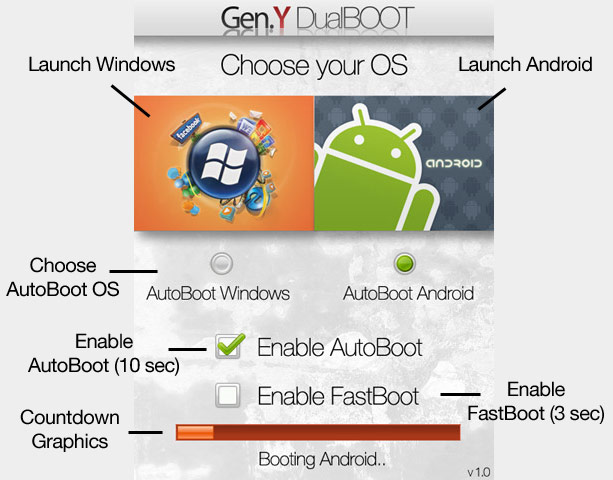
As I’ve reported earlier, you can now run Android 2.X on your Windows Mobile smartphone with a little tweaking. Well, here’s new and easy way to run Android on your Windows Mobile device; Gen.Y DualBOOT.
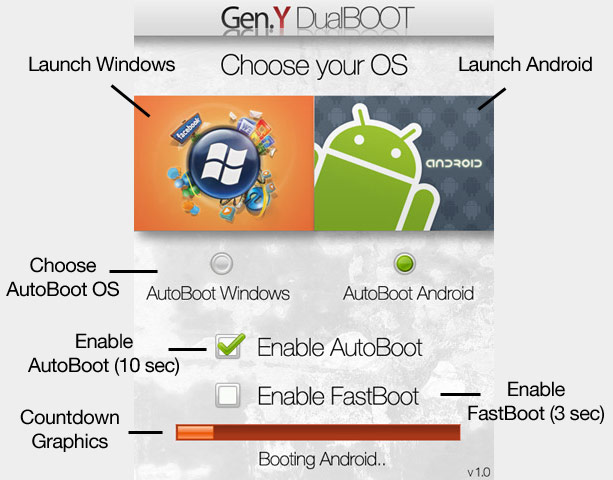
What Gen.Y DualBOOT does is let you dual boot your handset in either Windows Mobile or Android. What you have to do first is get Android and put it on your memory card. Then grab Gen.Y DUALBOOTand install it. You will then be presented with a new dual boot menu once you have rebooted your phone. Here’s a video demo done by Brandon at Pocketnow:
Can’t wait to see this work on the HTC HD2 (so far it’s only compatible with previous HTC handsets like the Diamond2/TP2 etc..)
Buyer action
Where to buy or check next
Use this as the final check before ordering a phone, changing network or trusting a headline monthly price.