
Every spring, laptop manufacturers roll out shiny new hardware and convince students they need to spend a fortune to survive university. While Chromebooks are still the smartest choice for most, Apple’s MacBook Neo, priced at £599 in the UK (or £499 with education pricing), has turned heads. But step back from the hype and the picture becomes clear: Chromebooks for students remain the smartest purchase in 2026, and it is not particularly close.
What Happened
- Chrome OS: Simplicity That Actually Helps
- Google Workspace: The Ecosystem Students Already Use
- Price: The Argument That Keeps Winning
- Durability and Battery Life
- The Limitations and Why They Rarely Matter
- The MacBook Neo Is Good But Not the Point
Chrome OS: Simplicity That Actually Helps
The single biggest advantage Chrome OS offers students is that it stays out of the way. There are no sprawling system updates that hijack your machine the night before a deadline. There is no registry to corrupt, no driver conflicts, and no bloatware installed by the manufacturer. You open the lid, you are at your desktop in seconds, and you get on with work.
That simplicity is not a compromise, it is a design philosophy. Chrome OS boots in under ten seconds on even budget hardware. Updates happen silently in the background and apply on the next restart, which typically takes less time than unlocking your phone. For a student juggling lectures, part-time work, and a social life, a laptop that simply works every single time they open it is worth more than a spec sheet full of impressive numbers.
Google Workspace: The Ecosystem Students Already Use
Most UK schools and a growing share of universities already run on Google Workspace for Education. Assignments land in Google Classroom, group work happens in Docs and Slides, and hand-ins go back via Drive. A Chromebook drops into that ecosystem with zero setup friction: sign in once and every Docs file, every Classroom notification and every Drive share is waiting for the student from the first boot.

Chromebook Plus models now ship with on-device Gemini integration too, so study helpers for essay drafting, research summarisation and maths support work directly from the taskbar without a separate subscription. For a student whose day already lives inside Docs, Meet and Classroom, adding a Chromebook is the most friction-free upgrade path available.
Price: The Argument That Keeps Winning
A solid Chromebook for education costs between £200 and £350. The Apple MacBook Neo starts at £599 at full price, and that is before you factor in AppleCare, a case, and the inevitable dongle collection. The Acer Chromebook Spin 514, Lenovo IdeaPad Flex 5i Chromebook, and ASUS Chromebook Plus CX34 all deliver decent build quality, bright displays, and comfortable keyboards for well under half the Neo’s retail price.
That price difference matters enormously to families. It means a broken or lost device is a frustration, not a financial crisis. It means siblings can each have their own machine. And it means there is budget left over for a decent pair of headphones or a fitness tracker, things that arguably improve student life more than a Retina display.
Durability and Battery Life
Education-focused Chromebooks are built with actual students in mind. Ruggedised hinges, spill-resistant keyboards and MIL-STD drop testing are common features on the Lenovo, ASUS and HP models aimed at schools. You can throw one in a backpack, drop it on a library floor, and expect it to still work in the lecture hall an hour later.
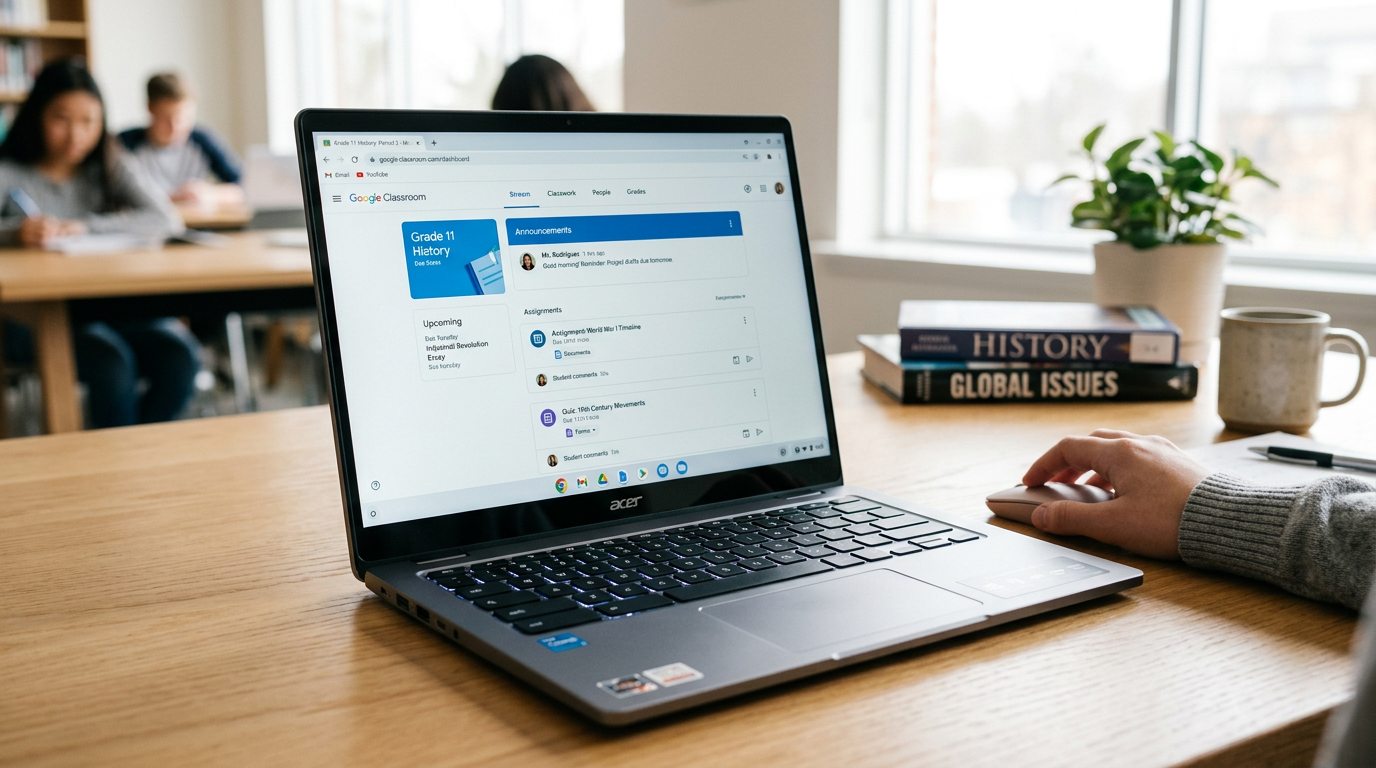
Battery life is equally impressive. Because Chrome OS is lightweight and efficient, most education Chromebooks comfortably last a full school day (eight to twelve hours) on a single charge. MacBooks have excellent battery life too, but a Chromebook achieves comparable endurance with a smaller, lighter, cheaper battery. It is efficient engineering in service of a real-world need.
The Limitations and Why They Rarely Matter
Critics will point out that Chromebooks struggle offline, cannot run professional software like Final Cut Pro or AutoCAD, and feel limited for creative work. These are valid observations, but they are largely irrelevant to the target audience.
Most students are writing essays, making presentations, conducting research, and collaborating on group projects. Google Workspace handles all of this brilliantly, and offline mode, while not perfect, has improved considerably. Google Docs, Sheets, and Slides all work offline now, syncing changes when connectivity returns.

For the small percentage of students studying film production, architecture, or engineering, yes, a more powerful machine running macOS or Windows is necessary. But these students typically have access to university computer labs with professional software, and they represent a fraction of the student population. Building your purchasing advice around edge cases is poor logic.
Chromebooks Are Still Better Value: The MacBook Neo Misses the Point
Apple’s MacBook Neo is a genuinely impressive machine for the money. But “impressive for a MacBook” and “the right choice for most students” are not the same statement. A student who buys a £250 Chromebook and spends the remaining £350 on experiences, savings, or other tools is making a smarter financial decision than one who stretches for a MacBook because it feels more premium.
Chromebooks are still the practical option, even if they are not exciting. They do not generate breathless launch coverage or inspire queues outside shops. But they turn on instantly, last all day, survive rough handling, run the software students actually use, and cost a fraction of the alternatives. In 2026, that combination remains unbeatable for education, and no amount of Apple silicon changes the maths.
Why Chromebooks for students still win on the maths that actually matters
The case for Chromebooks for students in 2026 has never been stronger on pure cost per productive hour. A decent Chromebook Plus now sits at £300 to £450 with eight years of software support, which works out to around a pound a week across the full GCSE-to-university window. The equivalent MacBook Air SKU is over a thousand pounds and depreciates faster because the silicon is advancing faster at the premium tier. For families buying on a student budget, the Chromebooks for students argument mostly writes itself.
What changed between the original Chromebooks for students era and 2026 is the software surface. Android app support is stable, progressive web apps are a genuine replacement for most of the installed-software workflows students actually need, and the on-device Gemini integration means every Chromebook Plus now ships with the same AI study-aid capabilities that were previously locked to the flagship Pixel and iPhone tiers. For essay drafting, research summarisation and maths help, the Chromebook AI experience is now peer-to-peer with anything Apple or Samsung ships.
Where Chromebooks for students still do not win is specialised disciplines. Architecture, music production, serious video editing and any course that mandates a specific Windows-only application remain genuinely harder on ChromeOS in 2026. Check the course software list before you commit, and if there is a single Windows-only tool that runs the whole course, buy the Windows laptop. For the vast majority of mainstream courses, though, Chromebooks for students are the smartest spend on the shelf, and the margin over the alternatives keeps widening.
MMTW Editorial
Buyer action
Where to buy or check next
Use this as the final check before ordering a phone, changing network or trusting a headline monthly price.














Reader discussion
Leave a comment
Comments are moderated. Keep it useful, accurate, and on topic.