This post is from our Windows Phone 7 archive. For our current coverage of Windows 8 Metro UI archive, see our 2026 Latest technology news.
Read the 2026 Latest technology news guide →News · 2 Jun 2011 · MTW Editorial Team
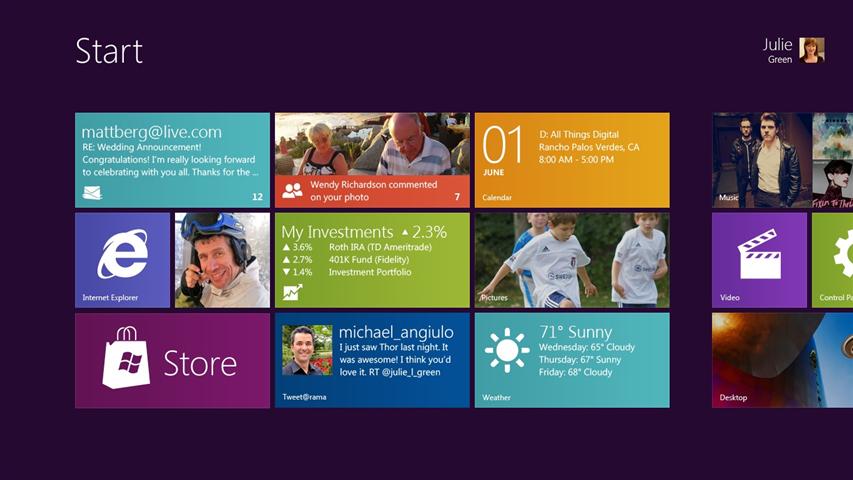
After months of leaks and rumors the Windows 8 UI has finally been unveiled by Microsoft’s Windows Division President Steven Sinofsky today at the D9 conference.
As you can see in the picture below the UI is heavily influenced by Windows Phone 7‘s Metro UI where Application can be pinned directly on the home screen. The Metro like UX is actually a shell running in windows this means that you will also have access to the “regular”desktop UI for legacy apps and other tasks as seen in the video after the break. Both regular and Metro UI will always be on and apparently can’t be switched of.
According to has been said Windows 8′s software ecosystem will essentially be composed of to types of applications: regular ones (C++,C# etc) that will run exactly like the ones we have right now on Windows and lightweight HTML5 / Javascript applications that will use internet Explorer’s rendering engine. Surprisingly Silverlight isn’t mentioned at all. This will surely fuel the “Silverlight is dying” talk in the days to come and makes me wonder if it will now only be relevant for Windows Phone 7.X development. Microsoft has also tweaked the touch interface to to make the regular application useable with finger touch. Video and pictures after the break:
As previously rumored windows 8 will also have its own application store directly accessible via the start screen as seen in the picture above.


Check out the Video of the Windows 8 UI:
Here are a few aspects of the new interface we showed today:
• Fast launching of apps from a tile-based Start screen, which replaces the Windows Start menu with a customizable, scalable full-screen view of apps.
• Live tiles with notifications, showing always up-to-date information from your apps.
• Fluid, natural switching between running apps.
• Convenient ability to snap and resize an app to the side of the screen, so you can really multitask using the capabilities of Windows.
• Web-connected and Web-powered apps built using HTML5 and JavaScript that have access to the full power of the PC.
• Fully touch-optimized browsing, with all the power of hardware-accelerated Internet Explorer 10.
The Professional Developer Conference ( PDC ) has now also been renamed to Build.
Buyer action
Where to buy or check next
Use this as the final check before ordering a phone, changing network or trusting a headline monthly price.