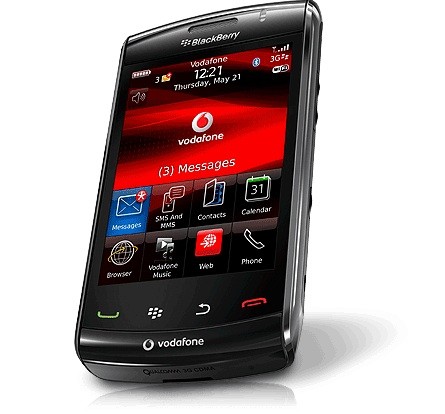
First BlackBerry Storm2 review, too little too late?
The CrackBerry junkies are the first to post a full blown review of RIM’s second touchscreen smrttphone, the Storm2 and frankly it doesn’t look that exciting…

The CrackBerry junkies are the first to post a full blown review of RIM’s second touchscreen smrttphone, the Storm2 and frankly it doesn’t look that exciting to me. What I get after reading the review is that RIM fiannly fixed all the major bugs/problem of the original Storm (mainly the sluggyness of the software and the new SurePress screen). The browser still doesn’t support tabed browsing, no Multi-Touch in their as well even though the hardware supports it etc…You can hatethe iPhone as much as you but it’s kind of sad when one of the most exciting feature of the Storm2 is the proximity sensor…(which Apple introduced on the Original iPhone in 2007).
The BlackBerry Storm2’s enhanced SurePress technology addresses the issues of the BlackBerry Storm’s original SurePress design:
•Consistent Pressure – Because the screen is now sitting on four evenly spaced ‘buttons’ (for lack of a better word), the amount of pressure required to create a click is consistent regardless of where you press.
•Multi-press capabilities – The improved SurePress hardware allows you to click on more than one part of the screen at a time. Taking advantage of this, RIM has allowed the software to now register two inputs on the keyboard. This is extremely beneficial when typing on the full qwerty keyboard in landscape. When typing letters across the keyboard from each (you are alternating between your left and right thumbs), you can now execute these letters more quickly as you can press the next letter without waiting for the screen to finish rebounding from the previous letter. It’s more like typing on a physical full qwerty smartphone.
•Smoother Rebound – Clicking in and out on the BlackBerry Storm2’s display is simply much smoother now, thanks again to the four electric button design. Use it side by side with the Storm and you’ll immediately feel the difference.
•Face Detection feature! – Last, but certainly not least, the BlackBerry Storm2 features a proximity sensor that powers down the display when the phone is next to your ear on a call. Earlier hardware/software versions we have seen of the Storm2 never possessed this feature, but this review unit certainly does. Simply start talking with the BlackBerry Storm2 against your ear and the screen powers down – no more ear typing! As soon as you pull the phone away from your ear the screen powers on and you can enable calling features (mute, speakerphone, etc.). Finally!!
All in all the Storm2 is a solid device and truly what the original Storm should have been.
Read the full review here
How we test
Buyer action
Where to buy or check next
Use this as the final check before ordering a phone, changing network or trusting a headline monthly price.