Microsoft 365 Copilot is the AI assistant Microsoft has woven into Word, Excel, PowerPoint, Outlook and Teams, and for UK small businesses the question in 2026 is no longer what it does but whether it is worth paying for. A limited-time discount has pulled the business price down to £13.80 per user per month on an annual plan, but that promotional rate is due to end on 30 June 2026, and a capable free tier called Copilot Chat now sits alongside it. This guide lays out the current UK pricing in pounds, what each tier actually unlocks, the licensing you need first, the data-protection position, and a clear verdict on whether a small firm should buy now, wait, or stick with the free option.
Key facts
The Copilot Business add-on is £13.80 per user per month on an annual commitment, a limited-time discount from £16.10 running to 30 June 2026 (Microsoft UK pricing page, June 2026).
On a flexible monthly commitment the same add-on is £19.32 per user per month. All prices exclude VAT (Microsoft UK).
A separate qualifying Microsoft 365 plan is required first; the Copilot add-on cannot be bought on its own (Microsoft UK).
Microsoft 365 Copilot Chat is free for users with an eligible Microsoft 365 subscription, offering web-grounded AI chat but no Copilot inside Word, Excel or PowerPoint (Microsoft 365 blog).
Why it matters: with the discount ending and a free tier available, UK SMEs face a genuine buy-now-or-wait decision rather than a simple yes or no.
What Microsoft 365 Copilot actually does for a small business
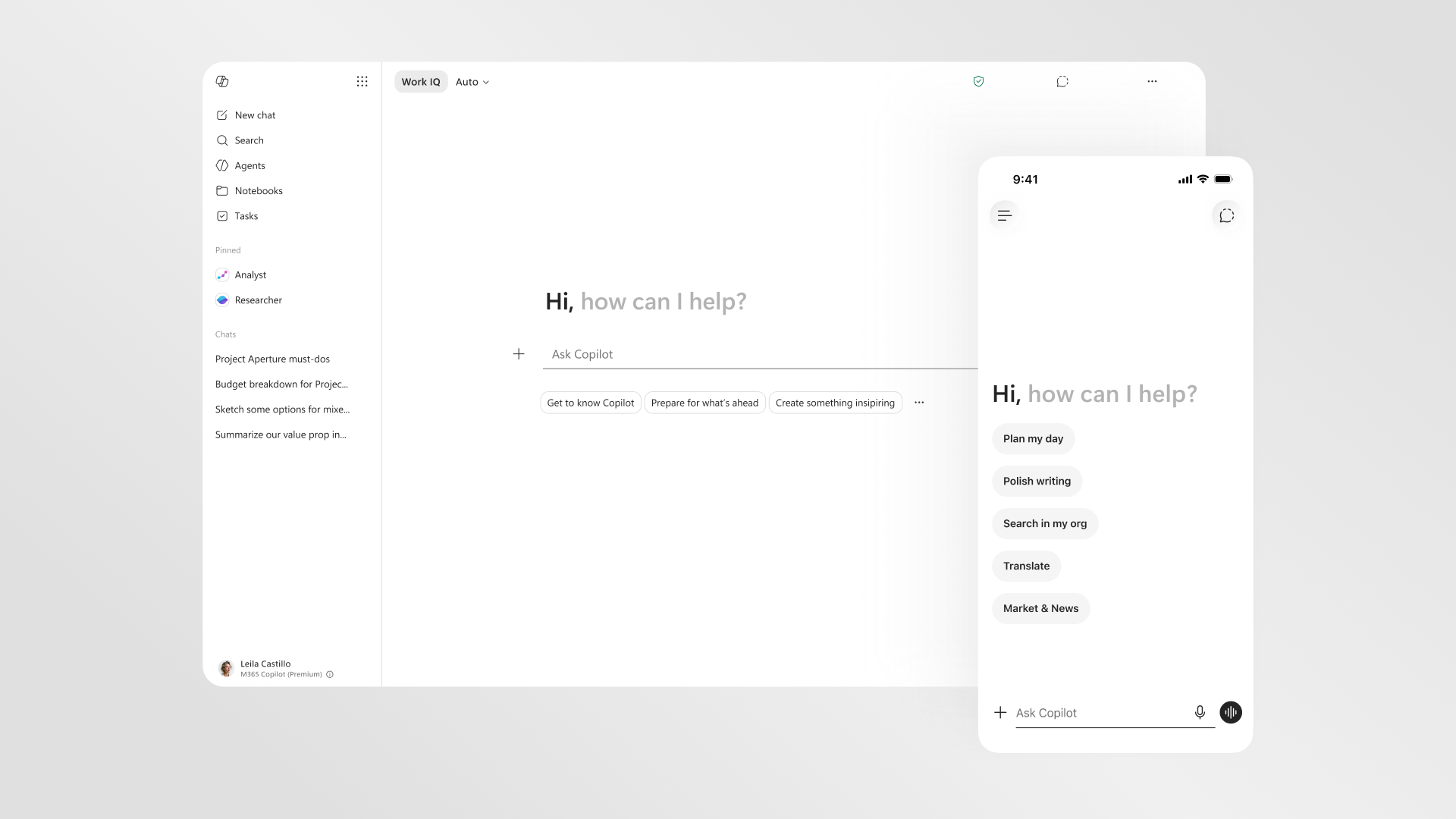
At its core, this is generative AI built directly into the apps your team already uses. In Word it drafts and rewrites documents from a prompt; in Excel it analyses tables, suggests formulas and surfaces trends in plain English; in PowerPoint it turns a document or a few bullet points into a deck; in Outlook it summarises long threads and drafts replies; and in Teams it produces meeting notes, captures action points and catches you up on a call you joined late. Tying it together is Copilot Chat, a conversational assistant that can reach across your emails, files, chats and calendar to answer questions grounded in your own organisation’s data, a capability Microsoft brands as Work IQ.
The 2026 version goes further than a chatbot. Through Copilot Studio, businesses can build agents, small automated assistants that handle repetitive jobs such as answering common customer queries, triaging a shared inbox or pulling figures from internal systems. Microsoft has redesigned the Copilot app around this idea, with named assistants like Researcher and Analyst sitting in the sidebar. For a UK firm without an IT department, the appeal is obvious: instead of learning a new tool, staff get help inside the software they open every morning. For the wider picture on how the assistants stack up, our comparison of Claude, Copilot and Gemini for UK business is a useful companion read.
UK pricing in 2026: every tier in pounds
Here is where it pays to read the small print, because the headline figure has moved. On Microsoft’s UK pricing page in June 2026, the Copilot Business add-on is listed at £13.80 per user per month when paid yearly, described as a limited-time discount from the standard £16.10, available from 1 December 2025 through 30 June 2026. If you would rather keep the flexibility to cancel month to month, the same add-on costs £19.32 per user per month. Crucially, all of these figures exclude VAT, so a UK small business should add 20% to estimate the real cost: at the discounted annual rate that works out at roughly £16.56 per user per month including VAT.
The table below sets out the tiers a UK SME is most likely to weigh up. Note that the free Copilot Chat option is not a trial; it is a permanent tier for anyone with an eligible Microsoft 365 subscription. The paid add-on is what brings Copilot into the desktop apps and gives access to richer features such as Work IQ. Because Microsoft prices these products globally and converts to local currencies, always confirm the live figure on the official page before you commit, as promotional windows and exact pence can change.
Image: Microsoft
Tier
UK price (ex VAT)
What you get
Copilot Chat (free)
£0 with an eligible Microsoft 365 plan
Web-grounded AI chat, basic functions in Outlook and the Copilot app; no Copilot in Word, Excel or PowerPoint.
Copilot Business add-on (annual)
£13.80 per user/month, limited-time from £16.10 to 30 June 2026
Copilot across Word, Excel, PowerPoint, Outlook and Teams, plus Work IQ and agents.
Copilot Business add-on (monthly)
£19.32 per user/month
The same as the annual plan but cancellable month to month.
Microsoft 365 Personal (consumer)
£8.49 per month or £84.99 per year
Office apps with limited Copilot for an individual, not a business licence.
Sources: Microsoft 365 Copilot UK pricing page and individuals pricing page, June 2026. Prices exclude VAT.
One point trips people up. The Copilot Business add-on cannot be bought on its own; Microsoft requires a separate licence for a qualifying Microsoft 365 plan underneath it, which we cover in the prerequisites section below. If you are still deciding between the free and paid routes, our deeper look at free Copilot versus Copilot Pro versus Microsoft 365 Copilot breaks down each option, and our guide to Copilot cost and verdict for UK small business goes further on the numbers.
The free Copilot Chat tier, and where it falls short
Before you reach for a card, it is worth understanding what the no-cost option gives you, because for some small firms it may be enough. Microsoft 365 Copilot Chat is available at no additional cost for users with an eligible Microsoft 365 subscription. It provides secure, web-grounded chat, so staff can draft text, brainstorm, summarise pasted content and ask general questions, with commercial data protection applied. It even includes basic Copilot functions in Outlook and the standalone Copilot app. For a micro-business that mainly wants a safe AI chat window rather than deep document automation, this can cover a surprising amount of ground at zero cost.
The catch is integration. The free tier does not include Work IQ and does not put Copilot inside Word, Excel or PowerPoint, which is exactly where the time savings tend to be largest. You also cannot lean on it to reason across your own files and emails in the way the paid version does. There is a middle path: agents. The free Copilot Chat can use simple agents at no extra cost, while agents that reach into shared tenant data are billed on metered consumption through Copilot Studio, with prepaid credit packs and pay-as-you-go options. For many SMEs the honest test is whether your team spends most of its day in documents and spreadsheets. If it does, the free tier will feel limiting fast.
Image: Microsoft
Does the cost stack up for a UK SME?
The maths is simpler than it looks. At the discounted annual rate of £13.80 per user per month before VAT, a five-person team costs about £69 a month, or roughly £828 a year ex VAT. The case for that spend rests on time saved. Microsoft and its early adopters point to real numbers: when NHS England scaled the assistant to more than 500,000 staff, early trials had staff saving an average of 43 minutes per day, according to a December 2025 update from Microsoft chief executive Satya Nadella. A small business will not see public-sector scale, but even a fraction of that, a few minutes shaved off emails, summaries and first drafts each day, can justify the price for staff on professional salaries.
The risk is adoption. The tools only pay back if people actually use them, and that is a cultural challenge as much as a technical one. As one insurance executive at Slovenia’s Zavarovalnica Triglav put it to Microsoft, there is no Copilot without the pilots, a neat reminder that the licence is the easy part and habit-building is the hard part. For a UK SME, the sensible move is to start small: license the handful of people who write, analyse and present the most, measure the difference over a month, and expand only if it sticks. Our piece on how to roll out Microsoft 365 Copilot in a UK business walks through that pilot-first approach, and the broader question of whether you actually need a paid AI subscription in 2026 is worth a read before you sign.
Video: Microsoft
The video above is Microsoft’s own announcement of Copilot Chat, the free tier that now anchors the bottom of the range. It is a useful primer on what the no-cost option includes and where the paid add-on takes over, which is the exact line a small business has to weigh. Watch it with one question in mind: how much of your team’s daily work happens inside chat versus inside documents? The answer points fairly reliably to which tier you need.
Licensing prerequisites you need first
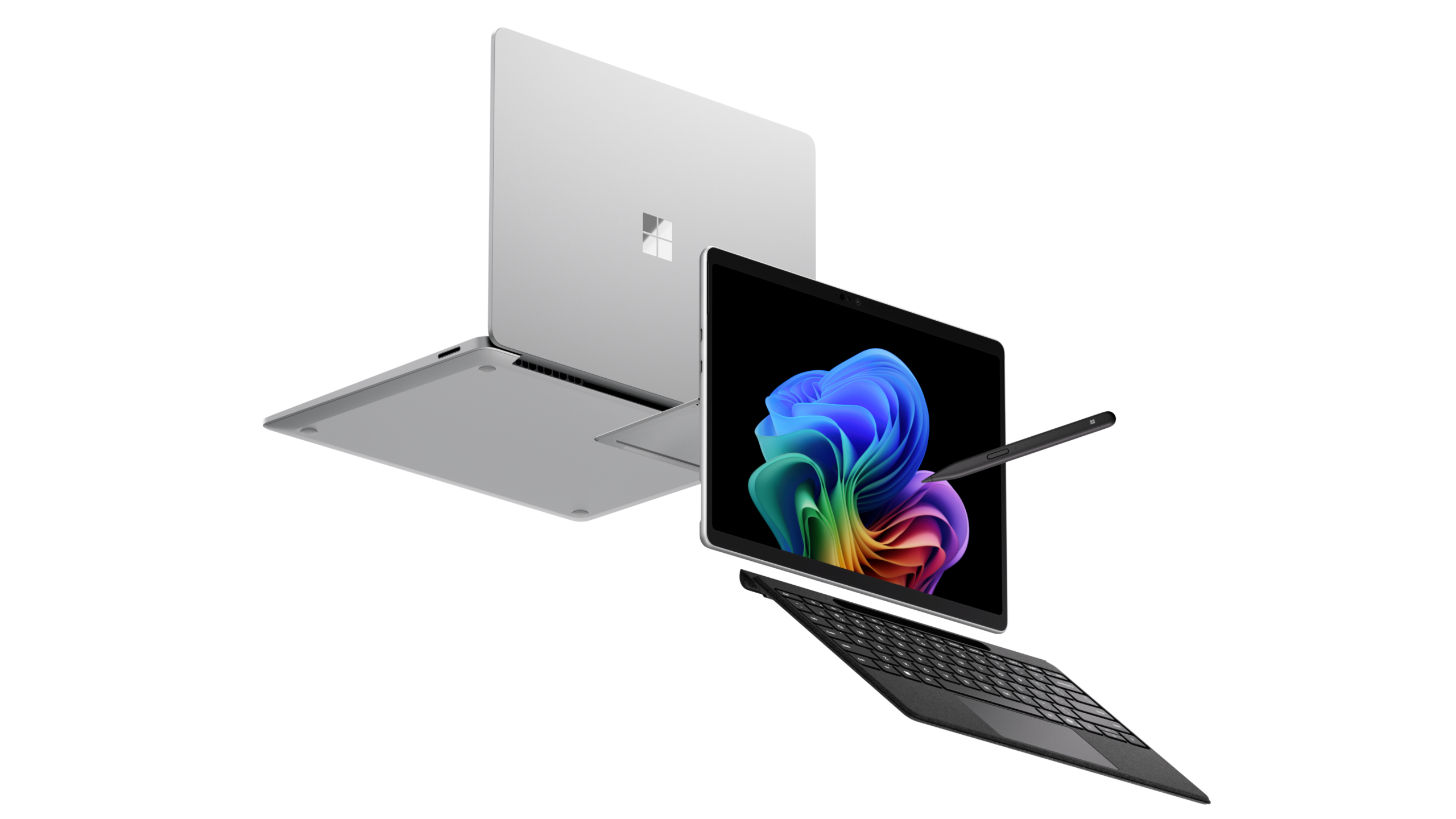
This is the step that catches small businesses out, so it is worth being precise. The Copilot Business add-on is exactly that, an add-on, and Microsoft requires a separate licence for a qualifying Microsoft 365 plan before you can attach it. In practice that means a business plan such as Microsoft 365 Business Standard or Business Premium sitting underneath each Copilot seat. So your true cost per user is the underlying Microsoft 365 subscription plus the Copilot add-on on top, not the £13.80 in isolation. If you are weighing up the hardware side too, our look at whether Microsoft Surface for UK business is worth it in 2026 and the Surface Pro 12 with Snapdragon X2 Elite buyer guide are useful, since Copilot runs across whatever Windows machines your staff already use.
Image: Microsoft
It is also worth knowing what counts where. The consumer Microsoft 365 Personal plan, at £8.49 per month or £84.99 a year, bundles a limited slice of Copilot for an individual, but it is not a business licence and does not give the commercial controls or the full app integration a company needs. Treat the consumer tiers as a non-starter for SME work, however tempting the lower headline price looks. For staff who only need light help, the free Copilot Chat tier is the right floor, and the paid Business add-on is the step up when document automation matters.
Data, privacy and what UK firms should check
For any UK business handling client or staff information, the data question matters as much as the price. Microsoft’s headline assurance is commercial data protection: when users are signed in with their work account, Microsoft states that prompts and responses are not used to train its foundation models, and that the enterprise data protection commitments that already apply to Microsoft 365 extend to Copilot. That protection covers the paid add-on and the free Copilot Chat tier when accessed with an eligible work account, which is an important reassurance for the no-cost option.
That does not mean you can switch it on and forget it. Copilot can only reach data the user already has permission to see, so its answers are shaped by your existing access controls. If your SharePoint and file permissions are loose, Copilot may surface information more widely than you intend, which makes a permissions tidy-up a sensible first step before a wider rollout. For UK organisations with compliance obligations, it is worth confirming data residency and your own UK GDPR responsibilities directly in the Microsoft documentation, and treating the public-sector example of Microsoft 365 Copilot in NHS England as a model for how carefully large, data-sensitive bodies approach the same questions.
Great to see NHS England scaling Microsoft 365 Copilot to more than 500,000 staff. In early trials, staff saved an average of 43 minutes per day, helping put more time back into what matters most, caring for patients.
Image: Microsoft
Satya Nadella, Chief Executive, Microsoft (LinkedIn, December 2025)
That figure is from a public-sector deployment at vast scale, so a five-person UK firm should temper expectations rather than bank on the same result. Still, the direction of travel is the point: the gains come from shaving minutes off routine writing, analysis and meeting admin across a team, day after day. Measure your own before-and-after rather than trusting any headline, and you will know within a month whether the spend is earning its keep.
Alternatives worth weighing before you buy
The add-on is not the only game in town, and a careful SME should price the field. The most direct rival is Google’s Gemini for Workspace, which plays the same trick inside Docs, Sheets, Gmail and Meet, so the deciding factor is usually which office suite your business already lives in. Our head-to-head on Microsoft Copilot versus Google Gemini for UK small business goes deeper, and our wider guide to choosing between Claude, Copilot and Gemini for UK work is the place to start if you are not wedded to Microsoft.
Beyond the big suites, standalone assistants such as Anthropic’s Claude and OpenAI’s ChatGPT can cover writing and analysis for a flat monthly fee, often cheaper per seat, though without the deep app integration that is Copilot’s whole pitch. There are also focused tools: our roundups of the best AI writing assistant in the UK for 2026 and the best AI meeting notes tools show that a small business can sometimes assemble cheaper point solutions if it only needs one or two jobs done. The trade-off is convenience versus cost: Copilot wins on living inside the apps you already use, the alternatives often win on price.
Image: Microsoft
Where to buy or check next in the UK
If you have decided to try the paid add-on, the cleanest route is Microsoft’s own UK pricing page, where the live figure and the discount deadline are always current; buy direct or through a Microsoft partner, who can often advise on the right underlying Microsoft 365 plan. Confirm whether you want the annual commitment at £13.80 per user per month before VAT, which locks in the lower rate, or the more flexible monthly plan at £19.32. Remember to budget for the qualifying Microsoft 365 subscription underneath each Copilot seat, since that is part of the true cost.
Before committing, do two things. First, switch on the free Copilot Chat tier for your team for a couple of weeks to see how much your staff naturally reach for AI at all; if uptake is low, the paid add-on will not fix that. Second, watch the calendar: the discounted annual rate is advertised only to 30 June 2026, so if you have already tested the tools and decided they earn their place, locking in the lower price before that date is the rational move. If you are still unsure, our guide on how to cut your AI subscription costs in the UK can help you avoid paying for seats you will not use.
For most UK small businesses the honest answer is a qualified yes, with timing the only real catch. If your team spends its day in Word, Excel, PowerPoint, Outlook and Teams, the paid Business add-on at £13.80 per user per month before VAT is reasonable value, provided you pilot it with the handful of people who write, analyse and present the most before rolling it wider. The time savings are real but they are not automatic; they depend on adoption, so buy seats for people who will use them and measure the difference over a month. If your needs are lighter, the free Copilot Chat tier is genuinely useful and costs nothing on an eligible plan, and it is the sensible starting point for any firm that is unsure. The one piece of urgency worth heeding is the discount: the £13.80 rate is advertised only until 30 June 2026, so a business that has already tested the tools and seen the benefit should lock in the lower price before it ends. A firm that has not tested it yet should not be panicked into buying by a deadline; start free, prove the value, then commit. Either way, sign in with a work account so the commercial data protection applies, tidy your file permissions first, and treat the licence as the beginning of the work, not the end of it.
How much does Microsoft 365 Copilot cost in the UK in 2026?
The Copilot Business add-on is £13.80 per user per month on an annual commitment, a limited-time discount from £16.10 running to 30 June 2026, according to Microsoft’s UK pricing page. On a flexible monthly plan it is £19.32 per user per month. All prices exclude VAT, so add 20% for the real cost.
Is there a free version of Microsoft 365 Copilot?
Yes. Microsoft 365 Copilot Chat is free for users with an eligible Microsoft 365 subscription. It offers secure, web-grounded AI chat and basic functions in Outlook and the Copilot app, but it does not include Work IQ or Copilot inside Word, Excel and PowerPoint, which is where the paid add-on adds the most value.
Do I need another subscription before buying Copilot?
Yes. The Copilot Business add-on cannot be bought on its own. Microsoft requires a separate licence for a qualifying Microsoft 365 plan, such as Business Standard or Business Premium, underneath each Copilot seat. Your true cost is the underlying Microsoft 365 subscription plus the Copilot add-on on top.
Is Microsoft 365 Copilot worth it for a small business?
For teams that work mostly in Word, Excel, PowerPoint, Outlook and Teams, it can be worth it, since the time saved on drafting, analysis and meeting admin offsets the cost. The gains depend on adoption, so the sensible approach is to pilot it with your heaviest users, measure the difference over a month, and expand only if it sticks.
Does Microsoft use my business data to train its AI?
When users are signed in with a work account, Microsoft states that prompts and responses are not used to train its foundation models, and that the commercial data protection that applies to Microsoft 365 extends to Copilot. This covers both the paid add-on and the free Copilot Chat tier when accessed with an eligible work account.
Can Copilot see files my staff should not access?
No. Copilot can only reach data a user already has permission to see, so its answers reflect your existing access controls. However, if your SharePoint and file permissions are loose, Copilot may surface information more widely than intended, which is why tidying permissions is a sensible first step before a wider rollout.
When does the discounted Copilot price end?
Microsoft advertises the £13.80 per user per month annual rate as a limited-time discount available from 1 December 2025 through 30 June 2026, after which the standard £16.10 rate is shown. Always confirm the live figure on the official Microsoft UK pricing page, as promotional windows can change.
What are the main alternatives to Microsoft 365 Copilot?
The closest rival is Google Gemini for Workspace, which works inside Docs, Sheets and Gmail, so your choice often follows whichever office suite you already use. Standalone assistants such as Claude and ChatGPT can be cheaper per seat for writing and analysis, but they lack Copilot’s deep integration into the Office apps.
We use cookies to make this site work, measure how it is used, and (with your consent) personalise advertising. Strictly necessary cookies always run. Analytics and advertising cookies run only if you accept. See our Cookie Policy and Privacy Policy.
Mobile Tech World is a trading name of Greyline Technologies Limited. Registered in England & Wales, company no. 16673047. Registered office: 71-75 Shelton Street, London WC2H 9JQ.
















Reader discussion
Leave a comment
Comments are moderated. Keep it useful, accurate, and on topic.