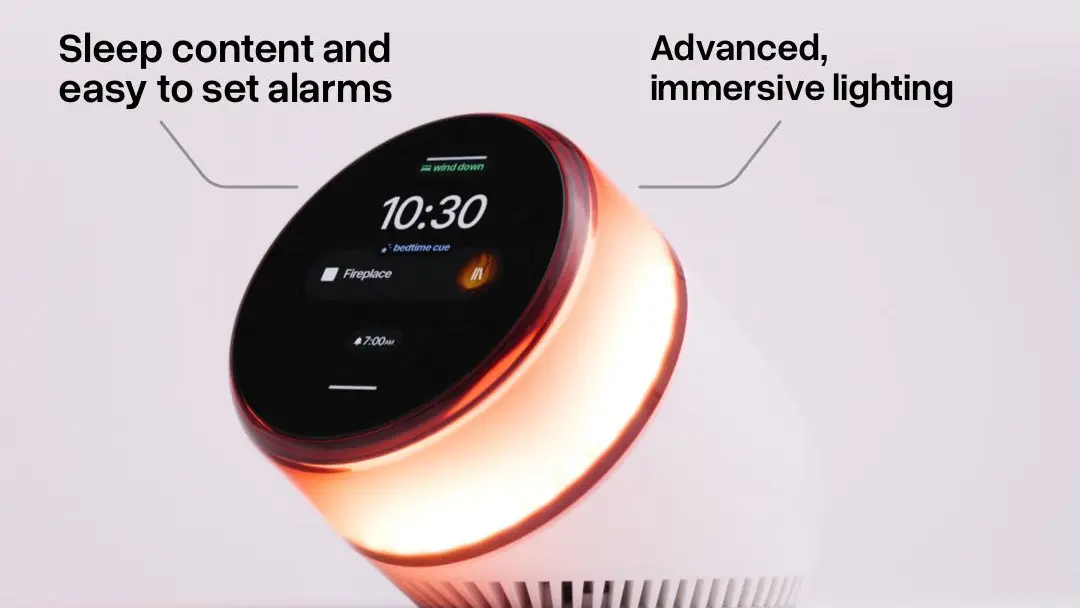
How to keep your phone out of your bedroom in 2026 has become a genuine engineering problem now that everyone has a smartwatch alarm, a podcast queue, a sleep tracker, and a 4 am push notification habit. Ambient Dreamie, the smart sleep companion that landed in late 2025 at £195 (about $249.99), has emerged as the gear-led answer, and combined with three settings tweaks on your existing phone, it lets you put your handset on the kitchen counter and reclaim the bedroom. This is the practical 2026 how-to, with the four steps that actually work.
- Replace the bedside phone with a dedicated alarm clock; Ambient Dreamie at £195 (about $249.99) is our pick.
- Move the phone charger outside the bedroom to break the proximity habit.
- Use Apple Sleep Focus or Android Bedtime to mute notifications between 22:00 and 07:00.
- Set a sleep wind-down audio routine on the new bedside clock or a HomePod / Nest speaker.
- Audit it weekly; phone-free bedroom is a habit, not a one-time setup.
Step 1: Replace the bedside phone with Ambient Dreamie
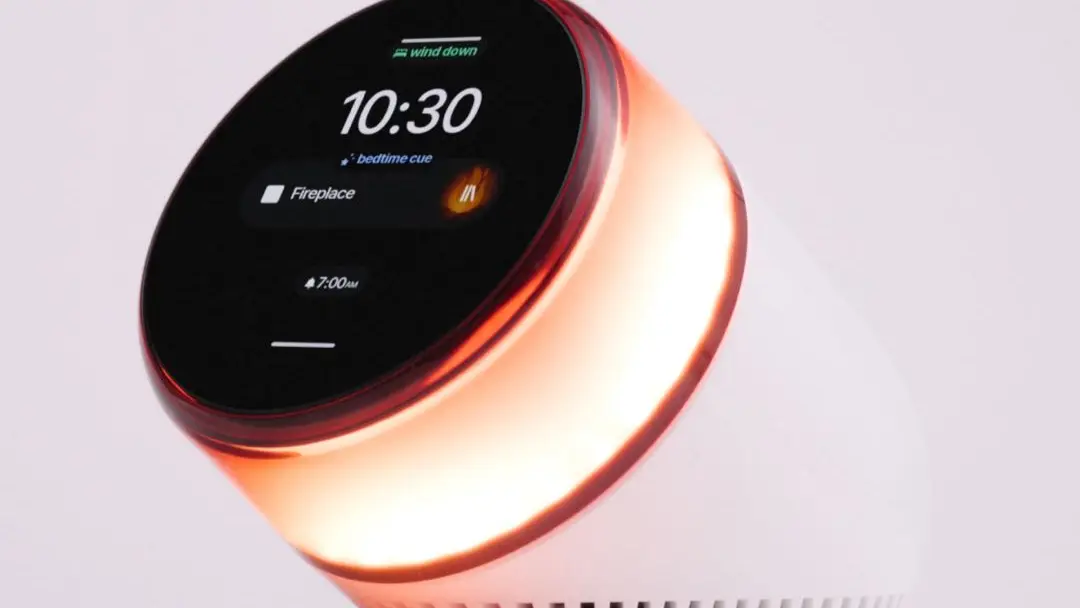
The single biggest reason most adults check their phone at 3 am is because the phone is the alarm clock and the alarm clock is on the nightstand. Removing the phone from the nightstand is the most effective change you can make. The 2026 product to use is the Ambient Dreamie at £195 (about $249.99). It is a £200 (about $250) alarm clock, which sounds absurd until you use it for a week and realise you stopped reaching for the phone. Dreamie’s sleep routine modes (Bedtime Cue, Wind Down, Noise Mask, Back to Sleep) handle every job the phone used to do at the bedside, without any internet connection, app dependency, or notification surface.
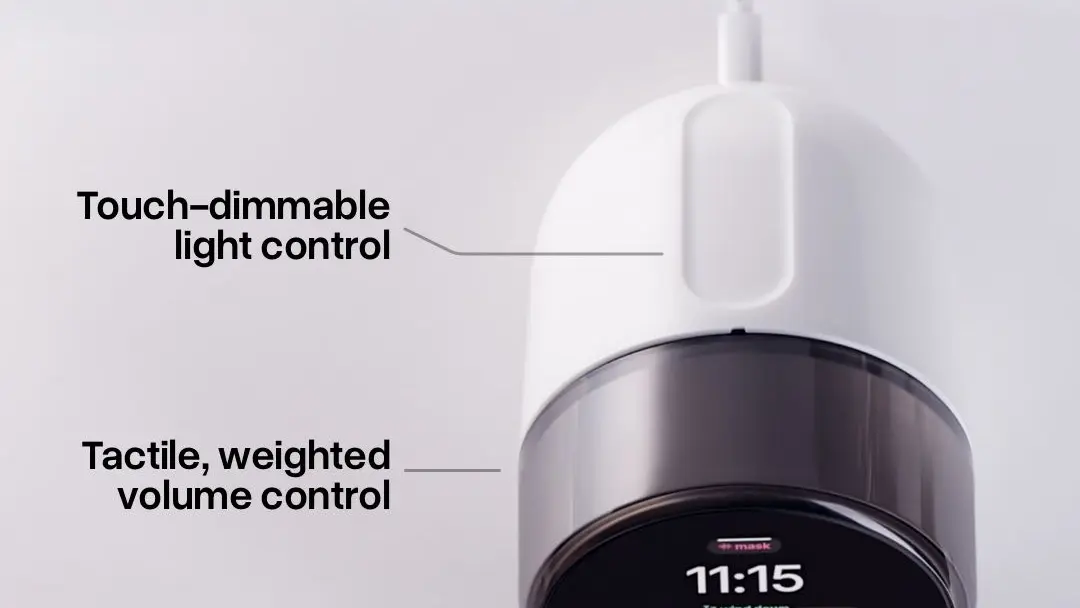
What Dreamie ships with that justifies £195 (about $249.99): a touch-strip lamp dimmer, a control ring for volume, a built-in audio library of soundscapes and noise masks, podcast streaming via Bluetooth from any source, USB-C charging for your devices, and a wake-up sunrise simulation. There is no companion app and no subscription. You set it up in five minutes from a single touchscreen on the front. The build is wood-and-fabric premium, not plastic alarm clock. Pair Dreamie with the rest of our 2026 smart home hub picks if you want everything in the bedroom to run independently of the phone.
Step 2: Move the phone charger out of the bedroom
This step is the unglamorous one and the one that actually works. Move the phone charger to the kitchen counter, the hallway, or any room that is not the bedroom. You will be tempted to “just keep it on the dresser by the door”; resist that. The behavioural research on smartphone habits is clear that proximity is the variable, not visibility. A phone on the dresser is a phone you will pick up at 1 am to check the time, then notifications, then social media. A phone in another room is one you will not retrieve until morning.
For couples, this is the harder negotiation. One partner often wants the phone close because of work-on-call expectations or family emergencies; the other wants the bedroom free. The compromise is that the on-call partner keeps an Apple Watch or Galaxy Watch on charging overnight, configured to forward only emergency contacts. Everyone else moves the phone out. The on-call partner gets the genuine emergency notifications; the bedroom stays free. We compared the relevant wearables in our Apple Watch vs Galaxy Watch UK guide.
Step 3: Configure Sleep Focus on iPhone or Bedtime mode on Android
Even with the phone out of the bedroom, you need to neutralize the notification graph. iPhone users open Settings, Focus, Sleep, and set the schedule to your actual sleep window (10:30 pm to 06:30 am is the default for most adults). Turn on “Smart Activation” and “Bedtime Mode” to ensure the screen dims automatically and call alerts go silent except for your “Allowed People” list. Add only family emergency contacts to that list. Android users on a Pixel or Galaxy device open Settings, Digital Wellbeing, Bedtime Mode, and configure the same window with Do Not Disturb enabled.
What both systems do not do well by default is block app push notifications during sleep hours but let the morning notifications surface gracefully. Apple’s Notification Summary at 07:00 am is the cleanest delivery, although it requires you to enable it manually. Pixel’s Adaptive Notifications is the Android equivalent and works similarly. The goal is to wake up to a single summary, not to a 600-notification cascade that has been queueing since 22:00. Treat this as the same kind of audit you would do for any other security boundary on your phone, similar to the lessons in our phone spyware protection guide.
Step 4: Set a sleep wind-down audio routine
Most people who use their phone in bed are not on social media; they are listening to podcasts or audiobooks to fall asleep. The phone-free bedroom needs an audio source. Dreamie has a built-in podcast queue, a soundscape library, and Bluetooth to a HomePod or Nest speaker. Pick the option that fits your existing audio ecosystem. Apple Music subscribers should use HomePod with a personal Sleep Routine in the Home app. Spotify subscribers should pair a Sonos Era 100 or a Google Nest Audio. Dreamie owners can use the built-in audio directly without any other speaker.
What works is a 30 to 45 minute wind-down routine that begins with a quiet podcast or audiobook for the first 20 minutes, transitions to a soundscape (rain, white noise, brown noise), and fades to silence by the 45 minute mark. Dreamie’s “Back to Sleep” scene can be configured to repeat a chosen audio source if you wake at 3 am, which means you do not reach for a phone to find an audio source. The full automation runs without the phone in the room. Compare these audio choices against our best smart speaker UK 2026 picks for the right hardware match.
Phone-free bedroom 2026: gear comparison
| Product | Price | MTW read |
|---|---|---|
| Ambient Dreamie | £195 (about $249.99) (about GBP200 / EUR230) | Best overall; no app, no subscription, premium build. |
| Hatch Restore 3 | £160 (about $199.99) | Strong runner-up; requires the Hatch app on the phone. |
| Lenovo Smart Clock 2 | £47 (about $59.99) (now discontinued) | Cheap option; uses Google Assistant, refresh overdue. |
| Loftie Clock | £135 (about $169.99) | Good middle pick; meditation and breathwork programs. |
| Apple HomePod mini | £78 (about $99) / GBP99 / EUR109 | Works as alarm + sleep audio if you already have Apple devices. |
What to do if you slip back to the phone in bed
Most people slip back within two weeks of the initial setup. The trigger is usually a single emergency where the partner brought the phone into the bedroom, or a weekend where the wind-down routine was skipped. That is fine. Reset on Sunday evening. Move the phone charger back to the kitchen, recommit to the Dreamie alarm, and reconfigure Sleep Focus. The behaviour is the habit; the gear is the prompt. Treat the phone-free bedroom like a workout routine, not a one-time installation. The research on screen time at bedtime is unambiguous that even a 30-minute reduction in pre-sleep screen exposure correlates with measurably better sleep quality.
If your work requires you to be reachable at night, the answer is still not to keep the phone in the bedroom. Configure Apple’s Emergency Bypass on the contacts who need to reach you, route those to your Apple Watch (which stays on a charger by the bed if needed), and leave the phone in the kitchen. The Apple Watch will buzz only for true emergencies. The bedroom stays phone-free. This same logic applies to Pixel Watch and Galaxy Watch users. We covered the wearable side in our foldable phone buying guide for the rare on-call worker who needs both.
For UK readers
UK buyers can pick up the smart-home and accessory kit referenced in this guide at Currys, Argos, John Lewis, Amazon UK and Apple UK direct — all stock Apple Watch, Pixel Watch, Hatch Restore and Loftie alarm clocks, with John Lewis adding the standard 2-year warranty at no extra cost on most devices. UK readers concerned about screen-time data should check the UK ICO Age Appropriate Design Code, which extends extra protections to under-18s on Apple Family Sharing and Google Family Link.
MTW verdict
The phone-free bedroom in 2026 is a £200 (about $250) Ambient Dreamie purchase plus the discipline of moving the phone charger out of the room. Configure Sleep Focus on iPhone or Bedtime Mode on Android, set a wind-down audio routine on the Dreamie or a HomePod, and audit your setup weekly. The result is genuinely better sleep, and we have been recommending exactly this since the Dreamie review embargo lifted in November 2025.
Buyer action
Where to buy or check next
Use this as the final check before ordering a phone, changing network or trusting a headline monthly price.













Reader discussion
Leave a comment
Comments are moderated. Keep it useful, accurate, and on topic.